

Scott Detroit
Participating Frequently
December 11, 2019
Question

Table of Contents not generating as WebHelp files

  • December 11, 2019
  • 5 replies
  • 243 views

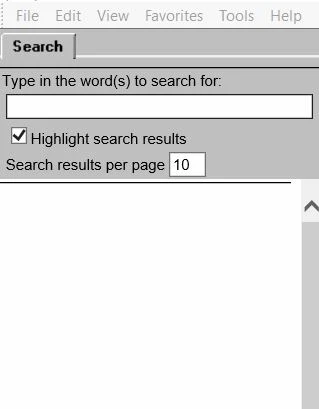
Hi everyone. I ran into a RH problem yesterday that I cannot solve. For work, I am using RoboHelp 2017. I have 3 projects that we promote to the application I support. Yesterday, I generated the webhelp files for all 3 projects, and our developer promoted them to one of our test environments. Two of the projects promoted fine. The third one promoted the changes I made to existing files, but did not promote 3 new files/topics I created. I tried to update those three files and generate them again as WebHelp files. However, when the project was promoted to our test environment again, the entire Table of Contents was gone except for the search field function that normally appears at the very top of them. I had a dev take a look at it, and he said that, for whatever reason, RoboHelp is not generating the TOC files like it is supposed to.
 

This topic has been closed for replies.

5 replies

Scott Detroit
Participating Frequently
January 9, 2020

I just wanted to update everyone on this... We eventually got the TOC to display properly. We removed the affected project entirely, and loaded a previous version of it that was known to work. I had to re-update the files, which was a pain, but that did the trick.

Peter Grainge
Community Expert
Community Expert
December 11, 2019

After generating the WebHelp files I can click on "View Results": the project pops up in RH with just the search bar at the top of where the TOC should display.


View Results should open the output in a browser. What you have said does not sound right. If you go to the output folder and open index.htm what do you see?


Where is the output being generated to? Hopefully the same drive as the project.


www.grainge.org

Use the menu (bottom right) to mark the Best Answer or Highlight particularly useful replies. Found the answer elsewhere? Share it here.
Scott Detroit
Participating Frequently
December 11, 2019

Thanks for the replies. Unfortunately, I cannot access the WebHelp SSL file for some reason, but I will check with a dev on that. Also, I can reproduce this locally. After generating the WebHelp files I can click on "View Results": the project pops up in RH with just the search bar at the top of where the TOC should display. We did try and move the files to a different location/folder on my machine, but I still ahd the same results. We have not looked at the CPD file in the project yet. I will run this by our dev tomorrow.

Peter Grainge
Community Expert
Community Expert
December 11, 2019

First question is does it work locally? If it does then something is not getting to the server correctly.


If it does not work locally then the first step would be to delete the CPD file in the rogue project, then reopen it and generate again.


Then try generating to a new location.


If still broken locally consider tags applied to the topics might be excluding them. Then compare the configuration of the output with a good project.


www.grainge.org

Use the menu (bottom right) to mark the Best Answer or Highlight particularly useful replies. Found the answer elsewhere? Share it here.
Jeff_Coatsworth
Community Expert
Community Expert
December 11, 2019

The first thing to check is if the output is working correctly in the \!SSL!\ folder - if it is, then your issue is with the "getting all the files into the app" part.