
Known Participant
October 20, 2013
Question

Table of contents stretching outside frame in Internet Explorer 8

  • October 20, 2013
  • 2 replies
  • 710 views

I have discovered that the table of contents stretches outside the frame when opening the multiscreen html5 help in Internet Explorer 8. I am using the Desktop knowledge with home page layout.

I am attaching a screenshot.
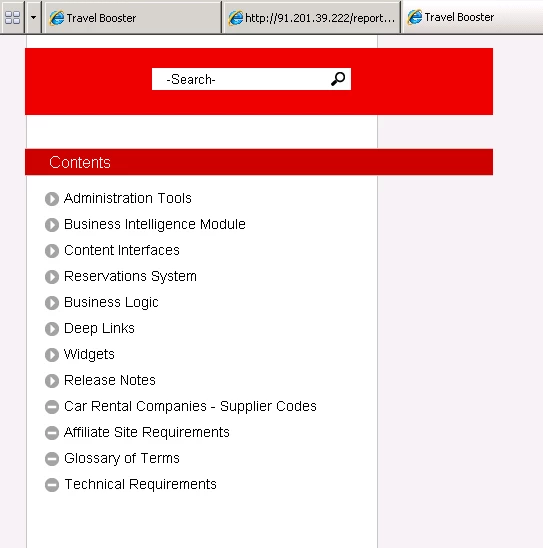
I have turned off the optimization option - Convert absolute image size to relative size.

This has not helped.

Any suggestions on how to solve this would be greatly appreciated.

Yehoshua Paul

This topic has been closed for replies.

2 replies

Rsfl
Inspiring
October 23, 2013

It might be a simple compatibility problem. I think IE did not support HTML5 sufficiently before version 9.

Known Participant
October 21, 2013

I have transferred this problem to the developers in my company. They should be able to solve the problem, but I would still be interested in hearing what people suggest.

Willam van Weelden
Inspiring
October 24, 2013

Hi,

IE8 is not supported for HTML5. This is not the only problem you will encounter on IE8.

The reason this problem occurs is that the background of the sidebar is a background of the page itself. It uses CSS3 to make it as wide as the sidebar. But IE8 doesn’t support this CSS.

If you want to solve this, you can do the following: Remove the background image from the body and add it to the sidebar. Then, give the sidebar a fixed position with top:0 and bottom:0 but keep the left, right and with intact. Then you need to add overflow:auto to the section that holds the TOC.

Greet,

Willam

Known Participant
October 27, 2013

William.

Thank you!

As of now, this is the only problem that I and members of the QA team have managed to find so far.
One of the developers managed to solve the problem, he did something in the CSS that solved it. I am not 100% sure what exactly (he tried explaining it to me, but I didn't fully get it). I am going to pass on your suggestiong to him just to hear what he has to say, but as of now the help looks fine in IE8, 9 and 10, which is great for me.

Thanks again!

Yehoshua