


Known Participant
April 30, 2012
Question

Tables all jumbled up

  • April 30, 2012
  • 1 reply
  • 2480 views

Publsihing WebHelp using RoboHelp 8.0.2.08.

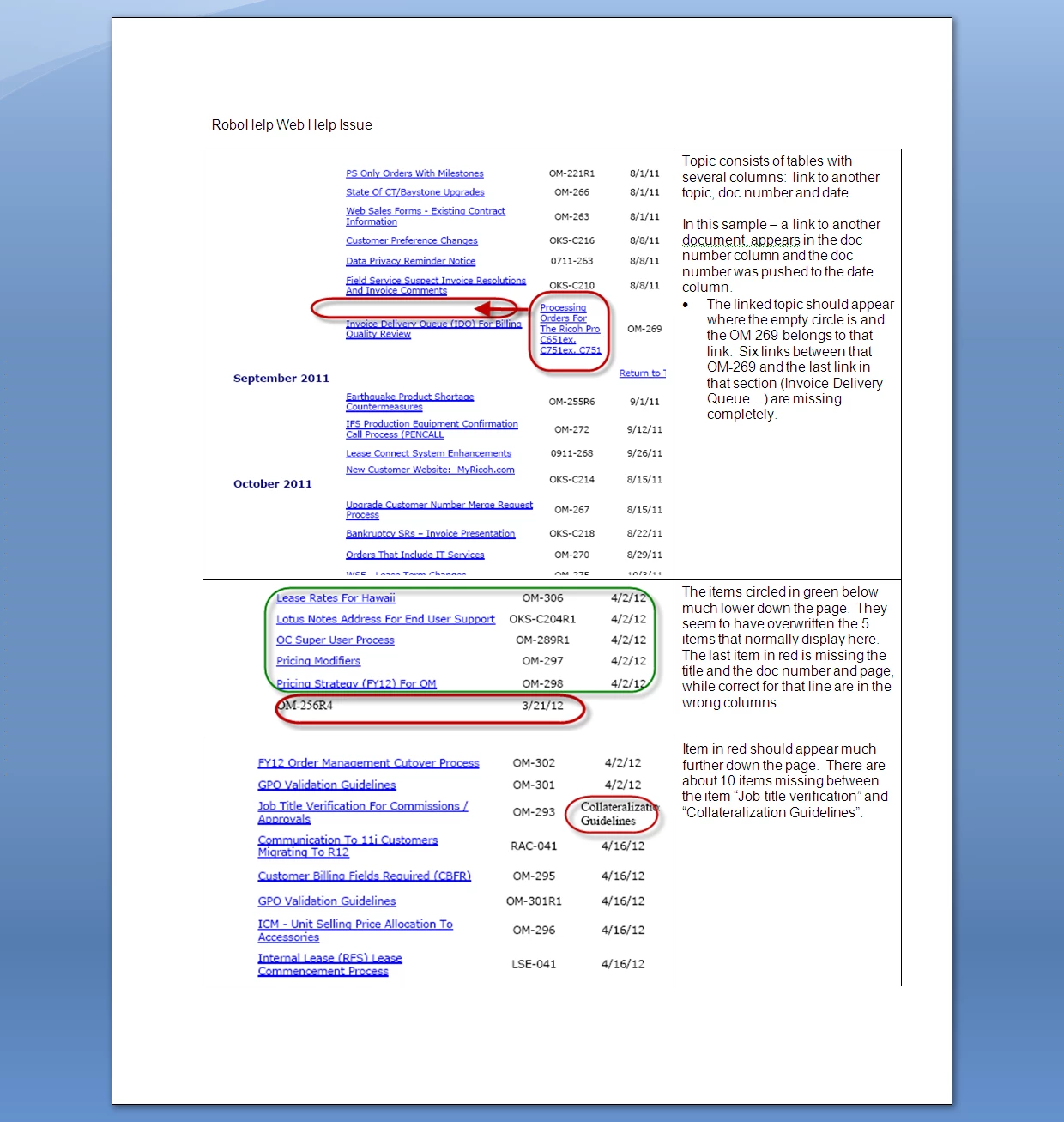
My team has encountered issues with tables getting all jumbled up and we're hoping someone can tell us what's going on and provide some suggestions of how to troubleshoot.  This has occured on  multiple computers, publishing different projects, publishing to different servers. It appears after generating.  In each project, we provide several topics that are lists of links to various topics. The information is presented in a table with a column for title, a column for doc number and a table for date.  At random times, seemingly after we add or update links, the table rows and columns get messed up.  A linked title suddenly appears in the doc number column for another document and several rows of links just disappear.  We've tried deleting the CPD and reimporting a "clean" htm file from a previous backup but when we do that, the links come in all broken - this seems to happen on these pages only as other imported htm files with links come in just fine.  I've attached a screen shot showing various examples.  Any suggestions would be greatly appreciated.

Thanks - Colette
This topic has been closed for replies.

1 reply

Community Expert
May 1, 2012

Perhaps a screenshot of a relevent section in RH might help, so we can see the table structure itself? I wonder if maybe there are merged cells or rows being used?

Known Participant
May 17, 2012

Even after several weeks of continued troubleshooting, we're still having this issue on multiple systems, primarily the same project but we have seen it on another project as well on a different system.  The problem is getting progressively worse. It seems that if we add a row to a table and hyperlink to a topic, the table usually gets jumbled.  Sometimes it seems to insert some random tag that means nothing and that we have not added. Other times, the columns seem to shift.  So far, it only seems to occur with tables that contain links to other topics.  The tables are basic tables that we've used for years in this project. We thought we were on to something when we discovered that the users was dragging and dropping a topic from the topic list into the table to create the link but it happens just as often if the link is manually typed and linked. I've attached screen shots of a correct view of the table published to WebHelp, a jumbled up table and the HTML code.  I would appreciate any input as we are at a dead stop and cannot publish until this is resolved (and we publish updates daily )  Thanks - Colette

Community Expert
May 18, 2012

Well, the content is not in a table, hence the incorrect display. It is displaying correctly as per the code in the page.

I also have no idea what the <u> tag is.

Is the code you posted taken from the Robohelp topic, or  from the webhelp output? If its the webhelp output, then seeing the code from within Robohelp might shed some light. If possible a snippet when it is correct in Robohelp and a snippet after it is broken.

Amber