
Known Participant
March 8, 2016
Question

Tabs disappear when I change the chm file name using RH 11 to generate HTML Help.

  • March 8, 2016
  • 2 replies
  • 314 views

I'm using RH 11 and generating HTML Help. When I generate the chm file, I get all three of the tabs I want: Index, Contents, and Search. But if I change the chm file name, the tabs disappear and I get the Show or Hide button, which doesn't work.

I'm changing the chm file name by clicking Single Source > HTML Help > Properties, and then changing the name in in the Outot folder and File name field.
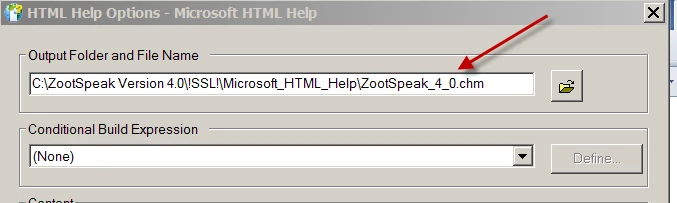
Why do my tabs disappear if I change the chm file name? The same thing happens if I change the name after I compile the chm file.

This topic has been closed for replies.

2 replies

Known Participant
March 8, 2016

Rick,

Here's the file before I make the change:

And here it is after I change the name:

When I click Show, it toggles to Hide.

If I change the name back to the original name and compile Help, the tabs appear. I also get the same results if I change the name in Explorer on my C: drive.

FYI, my everything is on my C: drive. Nothing is on the network.

Captiv8r
Legend
March 8, 2016

Hi there

How exactly are you opening the CHM file? Is it perhaps linked to an application? If so, it's likely the application is looking for the actual CHM file name.

Can you share a screen shot of what it looks like when it opens after you have made the name change?

Cheers... Rick