
JDHickey
Known Participant
January 23, 2017
Question

Text cut-off at the bottom of the window

  • January 23, 2017
  • 1 reply
  • 1847 views

Greetings!

Apologies if this has been posted already. I searched for it, but found nothing. If this has been dealt with already, please provide a link.

I'm working with a Framemaker book and I'm generating the online help in the Responsive HTML5 layout. I'm having a couple of issues with the output, but one of them is that the bottom part of the topic gets cut-off in the browser window (Chrome).
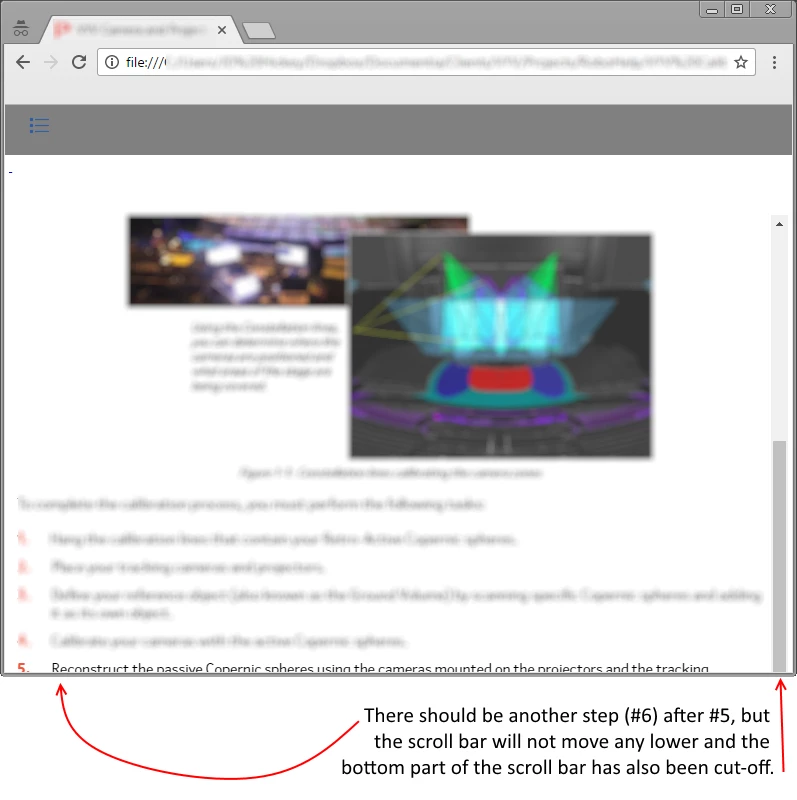
I have dragged the scroll bar down as far as I can, but the bottom of the scroll bar is also cut-off. The only way I can see the bottom of the window is to go full-screen, which is super annoying.

What do I need to modify so that the entire topic can be viewed (using the scroll bar) if the online help is not full-screen?
--

JD Hickey
Documentia Inc.
www.documentia.ca

This topic has been closed for replies.

1 reply

Willam van Weelden
Inspiring
January 24, 2017

Which version of FM are you using? And which layout? - I remember this being a problem when RH11 (FM11 too?) was released with one of the layouts. But I'm not sure whether this is the same problem.

JDHickey
JDHickeyAuthor
Known Participant
January 24, 2017

I'm using Technical Communication Suite 2015 (Framemaker 2015 and Robohelp 2015) and I'm using Responsive HTML5 layout.

Willam van Weelden
Inspiring
January 24, 2017

Are you using the Azure Blue skin? Or one of the Theme1 skins? I don't immediately recognise the skin.

Also, from the image, it seems like there is some white space below the header. Especially if you have more issues, something may have gone wrong in the skin. Can you choose a new skin from the gallery and try that one? Does that help?