


Known Participant
April 21, 2023
Question

Text Displaying at the tope of page that never display there before

  • April 21, 2023
  • 5 replies
  • 482 views

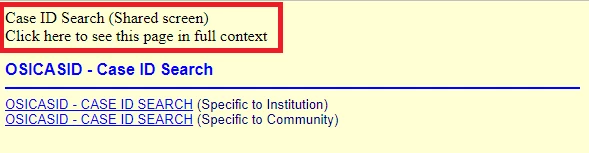
I generated my Robohelp Project this morning and now there is Text Displaying at the tope of page that never display there before.   I have attached a screen print of the what the page looks like.   The text is boxed in RED


Is there a setting that I can turn this off?


thanks


Sharon
    This topic has been closed for replies.

    5 replies

    Peter Grainge
    Community Expert
    Community Expert
    May 1, 2023

    When you look, see if you imported an output file instead of its source file.

    ________________________________________________________

    My site www.grainge.org includes many free Authoring and RoboHelp resources that may be of help.


    Use menu (bottom right) to mark as Best Answer or to Highlight particularly useful replies. Found the answer elsewhere? Share it here.
    Known Participant
    May 1, 2023

    When I get back to it again, I will confirm and send you the code that's in it that I think is causing the issue. 


    thanks for all your help and have a wonderful day.


    Sharon Restoule 

    Sharon RestouleSenior Systems Analyst/ProgrammerMinistry of Solicitor General and Correctional Services
    Peter Grainge
    Community Expert
    Community Expert
    April 21, 2023

    Yup, that's down to the call. TOC not showing, correct? 

    ________________________________________________________
    My site www.grainge.org includes many free Authoring and RoboHelp resources that may be of help.


    Use menu (bottom right) to mark as Best Answer or to Highlight particularly useful replies. Found the answer elsewhere? Share it here.
    Known Participant
    May 1, 2023

    Hi Peter

    I know what caused the problem however I didn’t have the time to troubleshoot any further.


    I was removing information from a page and replacing it with other information.  Then I got a requested to leave it the way it was so I imported the whole page from a recent project into the currently project that I’m working on.  


    There is some new code that appeared in the source code of that page that I imported back into the project.  So not to waste any more of my time, I just got a backup of the project where this issue didn’t exist and worked from it.


    Later when I have some free time, I would like to figure out why this happened because I would import pages from previous backups of the project and I had not encountered this issue before.


    Sharon Restoule


    Sharon RestouleSenior Systems Analyst/ProgrammerMinistry of Solicitor General and Correctional Services
    Peter Grainge
    Community Expert
    Community Expert
    April 21, 2023

    Now that you have added this is when the help is called from the app, that pretty much confirms it is the call as I suggested, not the updates. You haven't said whether it is 2019 Classic or the new UI. 

    ________________________________________________________
    My site www.grainge.org includes many free Authoring and RoboHelp resources that may be of help.


    Use menu (bottom right) to mark as Best Answer or to Highlight particularly useful replies. Found the answer elsewhere? Share it here.
    Peter Grainge
    Community Expert
    Community Expert
    April 21, 2023

    You haven't said which version of RoboHelp you are using. Please always start a thread with this information.

    • Please go to Help > About and include the full version number.
    • If you are using 2019 also state whether it is 2019 Classic or 2019 New UI.


    The second line is almost certainly because of the way the help is being called, usually though it would be on the right. Does the TOC appear to the left of what you have shown in your screenshot? I suspect it does not.


    Open the help in the generated output by double clicking the Start Page. Usually index.htm but it is whatever you have defined in the output. Select that topic from the TOC and I think you will not see that line. There is information about calling help on my site but I can't give you a link without knowing your version.


    I haven't seen RoboHelp generate the first line before but let's see the answer to the above first. Maybe if the help is opened that way the first line will also not appear.

    ________________________________________________________

    My site www.grainge.org includes many free Authoring and RoboHelp resources that may be of help.


    Use menu (bottom right) to mark as Best Answer or to Highlight particularly useful replies. Found the answer elsewhere? Share it here.
    Known Participant
    April 21, 2023

    thanks for the quick reply and for the information you have provided.  I will certain try what you have suggested and I will let you know if this fixed the issue.  


    Robohelp 2019 

    2019.0.14
     
    I have no issues with the General Help, it displays properly as shown below.   However the issue is when I display the Screen Specific Help within the Application . 
     
    I'm thnking that this issue maybe caused by many updates that are pushed to our computers in the Governement, and also the updates being pushed to  our testing environments.   I will try my other testing enviroments and see if this issue exists there,   I will keep you posted.
     
    Sharon RestouleSenior Systems Analyst/ProgrammerMinistry of Solicitor General and Correctional Services
    Known Participant
    April 21, 2023

    Those words that are displaying should be there in a blue ribbon like in the image I provided below in this message. 


    I'm getting close to solving this issue.   

    Sharon RestouleSenior Systems Analyst/ProgrammerMinistry of Solicitor General and Correctional Services
    John T Smith
    Community Expert
    Community Expert
    April 21, 2023

    You need to ask program questions in the forum for the program you are using
    To ask in the forum for your program please start at https://community.adobe.com/
    Moving from Using the Community (which is about the forums) to the correct forum