


May 20, 2012
Question

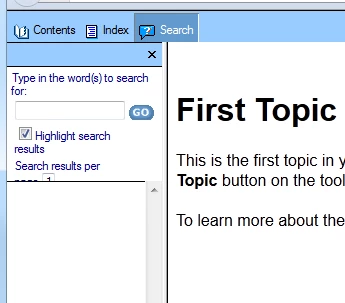
Text not visible in Search panel

Hi

I am publishing an output in the Webhelp layout.

The dialog box that appears on clicking the standard Search button is not getting resized when I decrease the search pane.

I have attached the screenshot for your reference. Please help.
Sreekanth

This topic is closed to new replies. Start a new post to keep the conversation going.

11 replies

Peter Grainge
Community Expert
Community Expert
May 22, 2012

Like a lot of stuff on the web, there is a minimum size below which an object cannot display properly.


See www.grainge.org for RoboHelp and Authoring tips

@petergrainge

Translate
Use the menu (bottom right) to mark the Best Answer or Highlight particularly useful replies. Found the answer elsewhere? Share it here.
May 23, 2012

Sorry Peter, I did not understand what exactly you mean by "minimum size" here. Can you please explain?

Translate
Peter Grainge
Community Expert
Community Expert
May 23, 2012

Simply a size below which something cannot be displayed nicely. A bit like trying to wear a shirt that is two sizes too small, it ain't going to look pretty.


See www.grainge.org for RoboHelp and Authoring tips

@petergrainge

Translate
Use the menu (bottom right) to mark the Best Answer or Highlight particularly useful replies. Found the answer elsewhere? Share it here.
Jeff_Coatsworth
Community Expert
Community Expert
May 22, 2012

Use the camera icon to put screenshots in your post using the web interface – attachments get stripped off

Translate
Captiv8r
Legend
May 22, 2012
Jeff_Coatsworth
Community Expert
Community Expert
May 22, 2012

Yes, I saw that one too, but it looked like there was two more in there that didn’t come through. Also, the first shot only sort of set up the question – it didn’t show the issue as far as I could tell…

Translate