
Known Participant
October 16, 2018
Question

Text output in Responsive HTML5 doesn't match source

  • October 16, 2018
  • 1 reply
  • 844 views

I've run into an issue with RH2017 where the text output does not match the source. As an example,in the source I've got section headings in Tahoma and the body text in Segoe UI, yet in seemingly random instances, the Responsive HTML5 output text is random in size and font style (Arial, New Times Roman, Calibri, etc.)

In some cases I've been able to go in and change the applied style to (none) and then reapply the intended font style and the output is fixed. This hasn't worked in all cases and yet I still don't see why the output style could be different from what is in the source content. Anyone have any ideas? Examples below:

Robohelp Source:

"Protocol Tab" is Tahoma; SIP Settings description is SegoeUI.

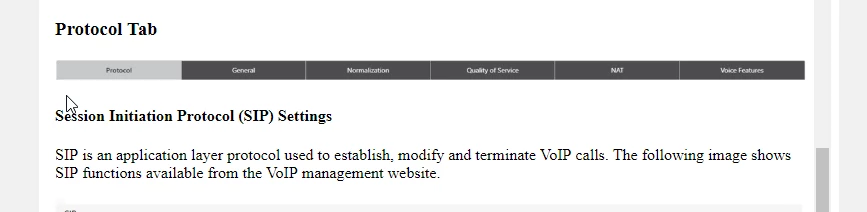
Responsive HTML5 Output:

"Protocol Tab" appears to be New Times Roman; SIP Settings description is Calibri.
This topic has been closed for replies.

1 reply

Inspiring
October 16, 2018

Likely a copy/paste error, such as from an email directly into the WYSIWIG editor. Happens to me often. I've learned to paste in the text in the HTML editor instead, but I sometimes forget. I just corrected some text like that in the past hour, actually. I had to delete about a paragraph of font tags to correct it! You'd think RH would just use destination formatting or paste it as Normal.

Known Participant
October 16, 2018

I was just considering this as I realized the suspect text was copy/pasted directly from an older online help my company produced. Looked at the HTML and saw the Arial tags. What a pain...

Peter Grainge
Community Expert
Community Expert
October 16, 2018

Look for Clear Formatting

Peter Grainge

www.grainge.org

@petergrainge

Use the menu (bottom right) to mark the Best Answer or Highlight particularly useful replies. Found the answer elsewhere? Share it here.