



Text Popups and %20% issue
Help....please....
RoboHelp 2015
WebHelp output
On occasion, after publishing to WebHelp, some of our text popups open with a garble of %20% inserted between words. This does not happen all the time. There are two of working in one Help project folder. I handle the "master" make updates and generate, and then hand off the folder to another writer, who in turn does the same. We have both had this issue popup (pardon the pun) and thought by inserting the text into notepad first and then pasting into the popups, that resolved the problem. Nope.
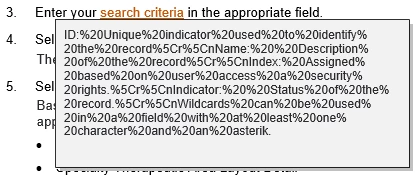
This is what one of our popups "gone bad" looks like:
ID:%20Unique%20indicator%20used%20to%20identify%20the%20record%5Cr%5CnName:%20%20Description%20of%20the%20record%5Cr%5CnIndex:%20Assigned%20based%20on%20user%20access%20a%20security%20rights.%5Cr%5CnIndicator:%20%20Status%20of%20the%20record.%5Cr%5CnWildcards%20can%20be%20used%20in%20a%20field%20with%20at%20least%20one%20character%20and%20an%20asterik.
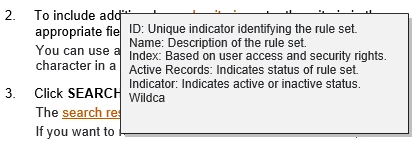
Yet, in other places, it is perfectly fine:
 AdChoices