
October 1, 2012
Question

the button "generate PDF" is grayed

  • October 1, 2012
  • 1 reply
  • 859 views

hello,

I work with Robohelp for Word, version 9.

I can't generate PDF because the button is grayed :
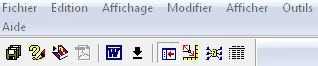
I try to re-install Robohelp for word, result is the same, I desinstall PDFCreator, the same. In word, the options "Acrobat PDFMaker Office COM Addin" and "Robohelp word COM addin" are checked

I have Adobe reader version 10.1.4

I have no more idea ...

Someone to give me the solution ?

Thank You

Marie-Noëlle

    This topic has been closed for replies.

    1 reply

    Jeff_Coatsworth
    Community Expert
    Community Expert
    October 1, 2012

    Remove all flavours of Acrobat & reinstall. Running the Reader & Distiller is not recommended.

    October 2, 2012

    Thank you Jeff for your answer, I reinstall Acrobat in simplified mode but it's always the same ...

    Priyank Shrivastava.
    Inspiring
    October 3, 2012

    Hi Marie,

    I guess there is some issue with the installation, as you already re-installed the Acrobat and Robohelp for word and problem still persist. For testing, please launch Robohelp HTML and create a blank project and see if you can see the PDF generation option grayed out or highted, if not then you need to completely uninstall Robohelp 9 and reinstall it once again and need to make sure that Acrobat Add should be checked.

    Please let me know if that helps.

    Thanks

    Priyank

    Thanks, Priyank Shrivastava