
Participant
June 14, 2013
Question

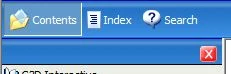
The Nav Bar items do not show at generated chm file

  • June 14, 2013
  • 1 reply
  • 1114 views

1) Using Robohelp HTML 10.0.1.292

2) Created a webhelp layout at single source layouts

3) Used the XP Blue skin

4) Generated the WebHelp

5) Converted Webhelp to CHM

6) The navigation bar displayed at the top of navigation pane does not display the items though they are configured at the skin
This topic has been closed for replies.

1 reply

Captiv8r
Legend
June 14, 2013

Hi there

Sorry, but we need more information. How exactly did you "convert" the WebHelp to CHM?

Did you simply generate a CHM from RoboHelp and expect the skin to be applied?

Did you run the WebHelp to CHM converter script supplied by Adobe?

Cheers... Rick

rrsaifanAuthor
Participant
June 17, 2013

I have created webhelp single source layout webhep_layout.  Then I have accessed the properties of webhep_layout: at Navigation, I set Skin Selection to XP Blue. Save and Generate.

Under File menu, Generate --> Webhelp to CHM Converter --> Select Webhelp Output SSL : webhep_layout --> Generate

I didn't run any script.  Just have selected the provided feature.

Thank you

RoboColum_n_
Legend
June 17, 2013

Hi Rick. Just a thought but maybe rrsaifan is referring to the browse sequence icons that only appear in the navpane if a topic that is contained in a Browse Sequence is selected?

rrsaifan. In the example below the "About Table Structure" topic is part of a browse sequence so the icons are active.

If this still doesn't help you, we need yet more detail. An image of what you are seeing would help with a description of what you are expecting to see.