

Known Participant
November 9, 2021
Question

The search does not work and the browser crashes.

  • November 9, 2021
  • 10 replies
  • 421 views

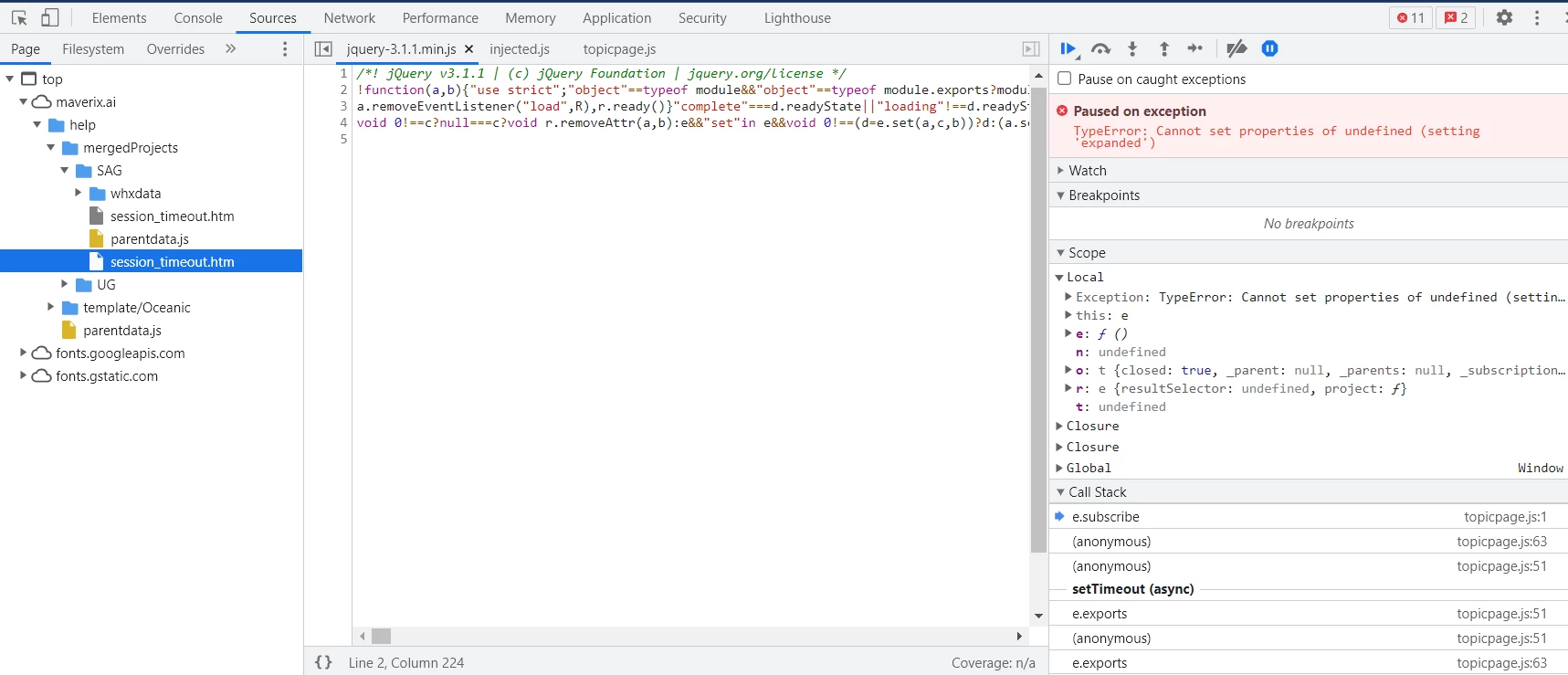
When I try to use the search site I get an error message in the debugger and the browser crashes. I am using the latest version of RH and the Chrome browser. Has anyone faced this problem?

 

    This topic has been closed for replies.

    10 replies

    Peter Grainge
    Community Expert
    Community Expert
    December 10, 2021

    Similar issue in this thread. I can't say for sure the solution is the same but it's worth a read. https://community.adobe.com/t5/robohelp-discussions/list-topics-in-search-tab-causes-the-program-to-hang-crash-chm-help-file/td-p/12581720

    ________________________________________________________
    See www.grainge.org for free Authoring and RoboHelp Information

    Use the menu (bottom right) to mark the Best Answer or Highlight particularly useful replies. Found the answer elsewhere? Share it here.
    Participant
    December 10, 2021

    Have you found how to solve this problem? We have the same problem, whatever the web browser used. So I'd really like to know what you've done o fix it! Thanks

    Community Expert
    November 17, 2021

    I'm also not sure how you have it stuck on permanently. When I close the devtools window, the setting is unset for me. 😞

    Community Expert
    November 11, 2021

    It's definitely never been on for me, so shouldn't be for your users. Your case is extra weird though because it is remembered when the developer tools are closed. For me, it isn't remembered when I turn it on then close the dev tools. Try turning it off, and hopefully it'll stay off. If not, I think you'll need to search the chrome developer forums for a way to turn it off for you permanently.

    AndreyGlAuthor
    Known Participant
    November 17, 2021

    Even if I can disable this feature in my browser, it won't solve the problem for documentation users. Or should I write to users: to use our documentation, please check if you have debugging enabled?

    Jeff_Coatsworth
    Community Expert
    Community Expert
    November 17, 2021

    I suspect it's highly unlikely that they would have it enabled - as @Amebr says, it's usually off by default - otherwise any pages on the web you tried to look at would halt all the time.

    Community Expert
    November 10, 2021

    With Chrome, do you have the DevTools window open when Chrome freezes? If so, the little blue pause button above the error message is the cause. When the Dev Tools are open and a page is loading, the loading will be paused if an "uncaught exception" is encountered - that's the little blue button at work. If you click the button, it should turn grey and the page should load correctly when you click refresh.


    AndreyGlAuthor
    Known Participant
    November 11, 2021

    Yes, this option is enabled, but I'm not sure if it's turned off by default for all users. I, for example, do not remember to turn it on.

    AndreyGlAuthor
    Known Participant
    November 11, 2021

    Проблема в том, что это происходит и при закрытом окне Inspection.

    Peter Grainge
    Community Expert
    Community Expert
    November 10, 2021

    Is this just from your machine, do others experience the same issue?


    Are you accessing a merged help child project directly rather than opening the parent and then searching?


    Beyond that and trying the sample project as suggested by @Jeff_Coatsworth I have no further answers so it will be your friends at Support. Try the email option as I am told it should get a better experience. They will engage with you and screenshare if need be.


    See https://helpx.adobe.com/contact/enterprise-support.other.html#robohelp for your Adobe Support options. Thoe email link tcssup@adobe.com is recommended as it reaches a team dedicated to Technical Communication Suite products including RoboHelp. 

    ________________________________________________________
    See www.grainge.org for free Authoring and RoboHelp Information

    Use the menu (bottom right) to mark the Best Answer or Highlight particularly useful replies. Found the answer elsewhere? Share it here.
    Peter Grainge
    Community Expert
    Community Expert
    November 10, 2021
    1. Whilst this is a very old item on my site, it could still be relevant. TOC Fails to load on server.
    2. Is it definitely a webserver rather than a network file server?

    ________________________________________________________
    See www.grainge.org for free Authoring and RoboHelp Information

    Use the menu (bottom right) to mark the Best Answer or Highlight particularly useful replies. Found the answer elsewhere? Share it here.
    AndreyGlAuthor
    Known Participant
    November 10, 2021

    I can see this error in different browsers, but Chrome freezes. This is a regular webhosting -- the Wordpress site is working perfectly on the another subdomain.

    Jeff_Coatsworth
    Community Expert
    Community Expert
    November 9, 2021

    Where's the output located - local or webserver? Is it happening with any other browsers?
    [Edit - is it working with the sample project?]

    AndreyGlAuthor
    Known Participant
    November 10, 2021

    I can see it only on webserver. Localy everything works well.

    Jeff_Coatsworth
    Community Expert
    Community Expert
    November 9, 2021

    What version of RH? All patched up?

    AndreyGlAuthor
    Known Participant
    November 9, 2021

    2020.6.0 

    AndreyGlAuthor
    Known Participant
    November 9, 2021

    Additionally, I use frameless output.