
johannas81194164
Participant
November 3, 2017
Question

Thousands of crazy urls

  • November 3, 2017
  • 2 replies
  • 302 views

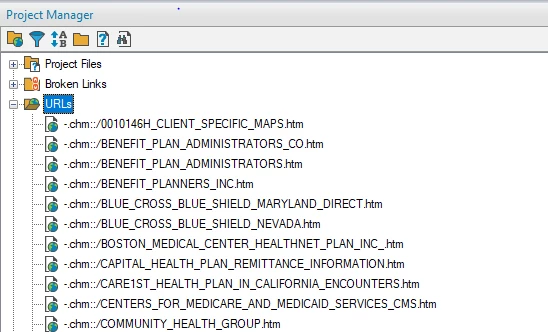
I recently imported a WebHelp project from version 10 to 17 and it's been a total nightmare.  I have almost 10,000 broken links that I've been repairing manually because I was told this was the only way.  That aside... Somehow my index completely disappeared the other day.  I looked in the directory and the hhk files listed were almost empty (1 KB).  I pulled an hhk from backup and copied it in the appropriate directory and I can now access my index when I am in RoboHelp.  However... there are now thousands of random urls listed (see snippit below).  They start with chm and then list part of my htm topic page names... or they only list half of the topic page name in some weird order.  It wouldn't really matter if they only appeared under the url folder... but when I try to search using the binoculars they all come up as choices and this gets frustrating.  Can someone let me know where these reside so I can go delete anything that doesn't start with http?
This topic has been closed for replies.

2 replies

johndaigle
Legend
November 3, 2017

Hi, Johannas

The double colon (::/) in the URLs follow the syntax for a link to a topic within a compiled Microsoft HTML Help file (.chm).

If you want those links to be valid, you would have to place the target .chm file in a location that is valid. This is a fairly archaic use since .chm files are being used less and less these days.

Here's a link that explains the syntax a bit more.

About HTML Help URLs (Windows)
If you inherited this project from someone else, you might want to ask them about the location of the missing .chm file.

John Daigle

Adobe Certified RoboHelp and Captivate Instructor

Evergreen, Colorado

www.showmethedemo.com

John DaigleAdobe Certified RoboHelp and Captivate InstructorNewport, Oregon
Captiv8r
Legend
November 3, 2017

HI there

While you might be able to sort where this list is stored, that's only part of the issue. The thing is, I believe that list is built by analyzing all the different topics in your project and noting the links. You will still need to visit each of the topics where these links appear and clean the links that way.

Cheers... Rick