


Participant
January 17, 2023
Answered

Thumbnails indentation

  • January 17, 2023
  • 2 replies
  • 318 views

Hello everybody,

It's my second post today, but it's the last one 🙂 I'm using RH 2020.8.34 and working on the frameless output, Oceanic skin. 

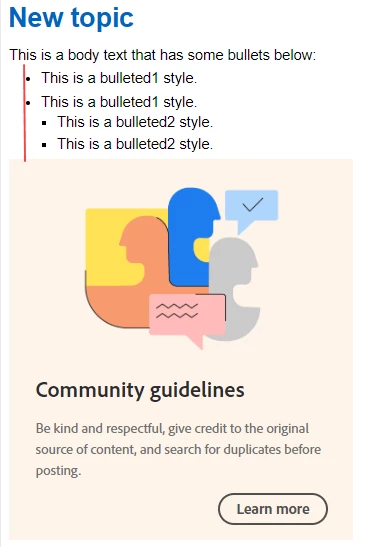
My content has different alignments, let's say I have something like on the screen below. I insert an image that refers to last three bullets (second bulleted1 and two bulleted2). To make it visually nice, I align the inserted image to the bulleted1 style alignment (let's say, 16px to the right, the red line below). For the regular images I created a separate image style with the needed indentation, and everything is ok.


But sometimes I insert huge images to show more content, so I need to use thumbnails to keep the visual consistency in my output. When I create a thumbnail, I'd like to indent it as well to the bulleted1 style. I created other style just for thumbnails and I tried to indent it manually in the Source view. 

Is it possible to indent thumbnails? If yes, how?
    This topic has been closed for replies.
    Correct answer Amebr

    If you create p styles (e.g. p.thumbnail1) with the same indent as your bullets and apply them to the image paragraphs, that should work. If you can't see the style when you try to apply it, just make sure the cursor is in front of or behind the image, rather than selecting the image. You can also use the tag breadcrumb bar at the top of the topic to select the whole paragraph.

    2 replies

    Peter Grainge
    Community Expert
    Community Expert
    January 18, 2023

    You can also apply image styles but there is the old trick of using Shift Enter at the end of the text in the list. The cursor will then line up with the text above and you can insert your image.

    ________________________________________________________

    My site www.grainge.org includes many free Authoring and RoboHelp resources that may be of help.


    Use the menu (bottom right) to mark the Best Answer or Highlight particularly useful replies. Found the answer elsewhere? Share it here.
    AmebrCommunity ExpertCorrect answer
    Community Expert
    January 17, 2023

    If you create p styles (e.g. p.thumbnail1) with the same indent as your bullets and apply them to the image paragraphs, that should work. If you can't see the style when you try to apply it, just make sure the cursor is in front of or behind the image, rather than selecting the image. You can also use the tag breadcrumb bar at the top of the topic to select the whole paragraph.

    Participant
    January 31, 2023

    Thank you Amebr one more time! This approach with p styles works perfectly. I played all the time with the img styles, that's why I couldn't align my thumbnails.