


Known Participant
February 6, 2025
Question

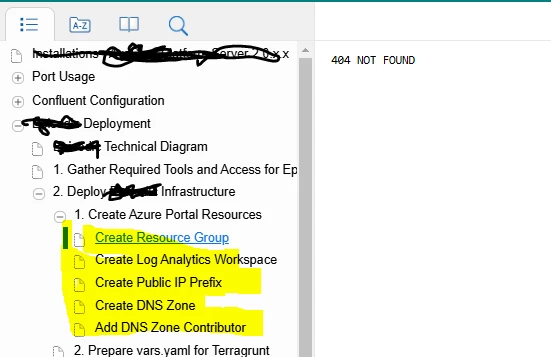
TOC Bookmarks do not work - takes user to 404 not found

  • February 6, 2025
  • 4 replies
  • 322 views

Hi! Im using RH 2022.5.28
I have added bookmarks from my topics to the TOC. Seems pretty basic but after generating, all items that are bookmarks give a 404 error - file not found

There are no spaces in the link name, but I  have updates the text of the TOC link. is that why they arent working? TIA.
 

    4 replies

    Jeff_Coatsworth
    Community Expert
    Community Expert
    February 7, 2025

    " but I  have updates the text of the TOC link."
    - what does this mean? What did you do?

    K_G0912Author
    Known Participant
    February 7, 2025

    It should have read, I have updated*
    I added the bookmark links to the TOC. Then once in the TOC, I edited the link's properties for a shortened name.

    Jeff_Coatsworth
    Community Expert
    Community Expert
    February 7, 2025

    A shorter display name in the TOC? That shouldn't have any effect - is the link URL still the same (and valid?) You verified that the target topic file actually exists on the SP site?

    Jeff_Coatsworth
    Community Expert
    Community Expert
    February 7, 2025

    Are you Publishing to the SP site? Maybe you need to try Generating SP output locally & then clean out the folders on SP and transfer the output manually.

    K_G0912Author
    Known Participant
    February 7, 2025

    This did not work unfortunately. But thank you for the reply.

    Peter Grainge
    Community Expert
    Community Expert
    February 7, 2025

    I assume you have generated a Sharepoint output. There aren't many Sharepoint users who help here so I suggest for this one you need to go to Adobe Support. See https://helpx.adobe.com/contact/enterprise-support.other.html#robohelp for your Adobe Support options. The email link tcssup@adobe.com is recommended as it reaches a team dedicated to Technical Communication Suite products including RoboHelp.

    ________________________________________________________

    My site www.grainge.org includes many free Authoring and RoboHelp resources that may be of help.


    Use menu (bottom right) to mark as Best Answer or to Highlight particularly useful replies. Found the answer elsewhere? Share it here.
    K_G0912Author
    Known Participant
    February 7, 2025

    Thank you. I will try this.

    Jeff_Coatsworth
    Community Expert
    Community Expert
    February 6, 2025

    Are you generating locally? Is the sample project working fine?


    K_G0912Author
    Known Participant
    February 6, 2025

    Locally appears to work but on the sharepoint site, they do not work