


Inspiring
August 12, 2021
Question

ToC broken after republish on site

  • August 12, 2021
  • 11 replies
  • 343 views

Robohelp 2020.5
Windows 10
Frameless output

Hi all.
After we generate a new output and publish it to our website, ToC goes to be broken for almost all users from different IPs, locations, PC's. 
Topics from Section A can be in Section C, etc. 
For example: 
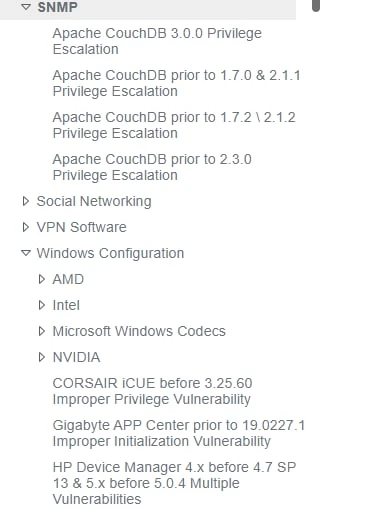
And correct variant:
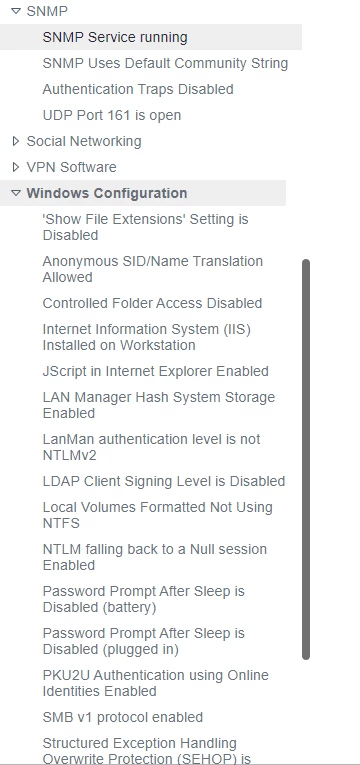
 

Right now SNNP section contain 4 topics from Databases. (What is interesting, is that Databases section containss 300+ topics and SNMP section only 4, which means that ToC takes the real number of topics in current section and after that puts wrong topics). 
Locally - everything is fine, so we are thinking this is cookies issue.
Our upload algorithm - delete all content of previous output -> upload new in empty folder 
We tried different browser, incognito mod, cache and cookie clearing - nothing. We also tried to go from empty VM - same result. Only 2% of computers display ToC correctly (we don't know why) 

This topic has been closed for replies.

11 replies

Peter Grainge
Community Expert
Community Expert
August 12, 2021

Locally - everything is fine, so we are thinking this is cookies issue.

Cache rather than cookies.


This seems to be a severe example of the problem. When I upload to www.grainge.org I often have to click Refresh but that usually works. However, when I upload a new menu top right it can be an hour or more before I see the changes. I'm guessing in your case some time has elapsed between the upload and problem being reported.


  1. Is this a new problem with an output that has previously worked or is it a persistent problem each time you generate?
  2. Have you run a file comparison between the local output folder and what is on the server?
  3. Try generating to a new folder on the server.


I'm not sure what else to suggest so it might be necessary to try support. See https://helpx.adobe.com/contact/enterprise-support.other.html#robohelp for your Adobe Support options. The email link tcssup@adobe.com is recommended as it reaches a team dedicated to Technical Communication Suite products including RoboHelp. 


Try the above first though and post back.

________________________________________________________
See www.grainge.org for free Authoring and RoboHelp Information


Use the menu (bottom right) to mark the Best Answer or Highlight particularly useful replies. Found the answer elsewhere? Share it here.