
sockmonkey-9vqzEd
Participant
October 18, 2014
Question

TOC button hidden when viewing responsive output in IE

  • October 18, 2014
  • 1 reply
  • 333 views

Hello there,

When I view responsive HTML5 output in Internet Explorer, the image that is used for the selected sidebar button (typically the TOC) is initially hidden behind the background color.
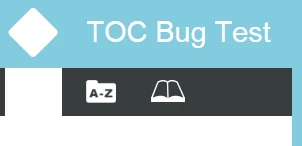
As soon as I mouseover the button, the image appears and everything works fine.

The problem does not occur in Firefox or Chrome. It also doesn't affect the buttons in the tablet/mobile modes, only the sidebar when viewing on the desktop.

I'm using a modified layout that is based on the Theme_1_Standard layout. However, the problem also occurs when using the default Theme_1_Standard or Theme_3_Black responsive layouts in a completely new project.

Any ideas?

RH Version: 11.0.3.268

IE Version: 10.0.9200.

This topic has been closed for replies.

1 reply

Peter Grainge
Community Expert
Community Expert
October 20, 2014

I'm not seeing the problem using Theme 1 Standard and IE11.

Try some different images and in different formats. I used a PNG image.


See www.grainge.org for RoboHelp and Authoring tips

@petergrainge

Use the menu (bottom right) to mark the Best Answer or Highlight particularly useful replies. Found the answer elsewhere? Share it here.
sockmonkey-9vqzEd
Participant
October 20, 2014

Thanks for the response Peter.

I converted the image to a GIF and updated topic.slp to use that instead of the PNG (the WYSIWYG editor only accepts PNG) but unfortunately the issue persists in IE 10.

Peter Grainge
Community Expert
Community Expert
October 21, 2014

I can't check IE10 until later in the day but I now realise PNG is the correct format. Can you try a different PNG image?


See www.grainge.org for RoboHelp and Authoring tips

@petergrainge

Use the menu (bottom right) to mark the Best Answer or Highlight particularly useful replies. Found the answer elsewhere? Share it here.