
Inspiring
September 9, 2018
Answered

TOC does not render (no Javascript?),RH 2017 HTML5 output

  • September 9, 2018
  • 1 reply
  • 544 views

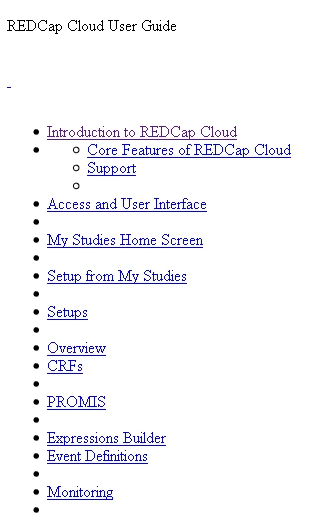
When I try to generate ah HTML5 layout out of my project, it looks like below. 

I'm also getting the error:  "The variables titleColor, backgroundColor, logo, and fontFamily are not available in the usersettings.js file.

You must upgrade your responsive HTML5 layout to the latest version to include these variables, so that the layout appears fine in the generated output.

Visit http://www.adobe.com/go/learn_rh_upgrade_html5_layout_en page for information about upgrading your layout." even though when I went to the web page and checked the files against the fixes, they appear to be fixed.

I need this ASAP, no kidding.   Having no end of problem with this and don't know why.

I have another project that works fine, and I don't know what the difference is.
This topic has been closed for replies.
Correct answer Peter Grainge

It looks like you have applied the updates but have not updated the layout. With Update 2 applied, open the layout and go to the Gallery. Select the layout and make a small change to its name, add a 2 to the end for example.

Use that layout and you should be OK. You will lose any customisation you have applied.

Do add the layout as I have described, not from Adobe's web page. That has not been updated!


See www.grainge.org for free RoboHelp and Authoring information.

@petergrainge

1 reply

Peter Grainge
Community Expert
Peter GraingeCommunity ExpertCorrect answer
Community Expert
September 10, 2018

It looks like you have applied the updates but have not updated the layout. With Update 2 applied, open the layout and go to the Gallery. Select the layout and make a small change to its name, add a 2 to the end for example.

Use that layout and you should be OK. You will lose any customisation you have applied.

Do add the layout as I have described, not from Adobe's web page. That has not been updated!


See www.grainge.org for free RoboHelp and Authoring information.

@petergrainge

Use the menu (bottom right) to mark the Best Answer or Highlight particularly useful replies. Found the answer elsewhere? Share it here.
Inspiring
September 13, 2018

Thanks again, Peter.  I really should put you on retainer.

Why is RoboHelp so persnicketty?

Peter Grainge
Community Expert
Community Expert
September 13, 2018

They had to change the structure of the layout to fix issues and they can't overwrite any layouts already in existence.


See www.grainge.org for free RoboHelp and Authoring information.

@petergrainge

Use the menu (bottom right) to mark the Best Answer or Highlight particularly useful replies. Found the answer elsewhere? Share it here.