

symmetricalMan
Inspiring
May 17, 2016
Question

TOC Entries in Responsive HTML5 won't Expand when Viewed Live

  • May 17, 2016
  • 1 reply
  • 614 views

RoboHelp 11, exporting as Responsive HTML5.

When I view the result locally (either from my PC, on via another PC on our network), 'books' in the TOC expand correctly, when clicked upon.

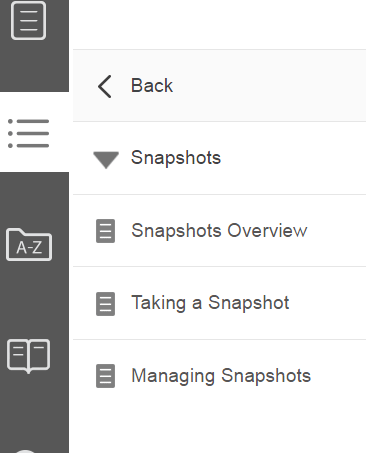
In the example below, I've clicked the "Snapshots" book entry in the TOC. Notice that it expands to display its sub-topics.
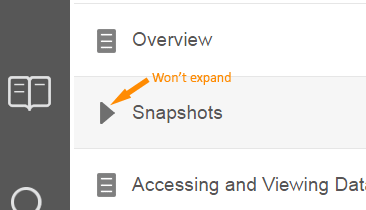
However, when viewed from our Corporate web site (i.e. after publishing the content 'live'), TOC no longer function correctly. Using the same example as above, when clicking/pressing upon the Snapshots TOC entry, the screen flickers slightly, but nothing else happens - the menu does not expand.
There's a few of us here at work (including myself) that this was working properly last week. We're now wondering if our Systems Admin have disable a script or something. Any ideas?

Note that I've also tried deleting the contents of the live directory, and doing a fresh export from Robohelp, but we get the same result.

This topic has been closed for replies.

1 reply

Jeff_Coatsworth
Community Expert
Community Expert
May 17, 2016

You'd think that if it was some corporate policy thing interfering, it would have manifested itself at the browser level for both the local build and the live location (you are using the same browser for both instances, right?) What happens if you access the live site from home or some other location that isn't within the corporate area? Does that have any impact? If not, then I think you're probably correct in thinking that they've disabled something on the web server that the HTML5 was counting on.

symmetricalMan
Inspiring
May 17, 2016

Thanks, Jeff.

I'm testing the site in Chrome and IE, both from my local PC, and via the remote location.

I have to make a correction; it's not so much a 'live' site, as a 'test' site, which can't be accessed from outside of the Corporate network. We upload to the test site first, before pushing it live. Either way, you may be right about any policy being the same for both instances, test and local.

After I posted this yesterday, I figured I'd create a brand new help in Robohelp, and upload it, just to test whether perhaps I'd done something wrong myself - I'd been tinkering with the HTML - I wanted to test a clean build. So, I used the default content supplied with RH, when you go to create a new online help, and it too has this issue with the TOC entries not expanding when I upload it to the test site - works fine when viewed from my PC (or even a shared network drive), but not via the Corporate test site.

Peter Grainge
Community Expert
Community Expert
May 18, 2016

Do you have any project that works OK on the Test site? My suspicion is that the Test site is not properly configured as a web server.


See www.grainge.org for RoboHelp and Authoring information

@petergrainge

Use the menu (bottom right) to mark the Best Answer or Highlight particularly useful replies. Found the answer elsewhere? Share it here.