
Participant
November 22, 2023
Question

TOC entries not aligning correctly in generated TOC in PDF document

  • November 22, 2023
  • 4 replies
  • 171 views

In the layout.css which is part of the template that I am using to generate the PDF, I assigned a left margin to the TOC entries. If the TOC entry spills to a second line, the margin is ignored. I tried setting some display options such as block to see if it would make a difference. It did not. Could this be a bug? If not, what setting an I missing? Here is a picture of what I am seeing in my generated TOC. The outlined area shows where it is ignoring the left margin.
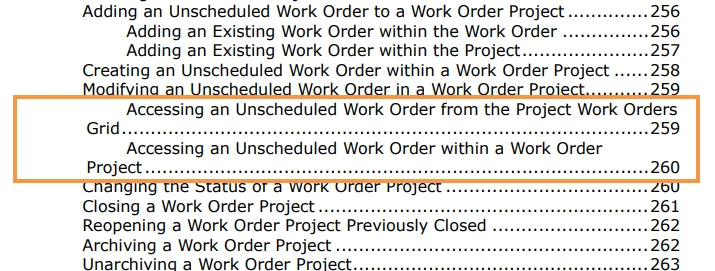
 

Thanks, in advance for your help.

    This topic has been closed for replies.

    4 replies

    Peter Grainge
    Community Expert
    Community Expert
    November 29, 2023

    Word has a first line indent setting. See if you can find something similar in CSS. 

    ________________________________________________________
    My site www.grainge.org includes many free Authoring and RoboHelp resources that may be of help.


    Use menu (bottom right) to mark as Best Answer or to Highlight particularly useful replies. Found the answer elsewhere? Share it here.
    Community Expert
    November 24, 2023

    What I suspect is that the tocentry style refers to a span tag, as this is what margin-left does to a span tag. What I don't know is whether the parent element is available to modify. I'll attempt to have a look tonight to see if I can figure something out


    You said you tried changing the tocentry to display: block. If the field is free-text, perhaps try adding !important immediately after block, to see if that forces the display change.

    Participant
    November 29, 2023

    I tried the "!important" in the layout.css for block. It did not change break within the TOC line. Here is an excerpt of the layout.css for a toc entry:


    }
    */
    .toc-level-2 {
    font-size: 12pt;
    text-decoration: none;
    font-family: Verdana;
    margin-left: 10px;
    display: block !important;
    break-inside: avoid;
    }
    .toc-level-3 {
    font-size: 12pt;
    text-decoration: none;
    font-family: Verdana;
    margin-left: 20px;
    display: block !important;
    break-inside: avoid;
    }
    .toc-level-4 {
    font-size: 12pt;
    text-decoration: none;
    font-family: Verdana;
    margin-left: 30px;
    display: block !important;
    break-inside: avoid;
    }

    Jeff_Coatsworth
    Community Expert
    Community Expert
    November 23, 2023

    Or use W/O for Work Order - that's what I use in my content.

    Peter Grainge
    Community Expert
    Community Expert
    November 22, 2023

    That would require editing the TOC levels in the layout CSS. Maybe Access an Unscheduled Work Order from Project Work Orders would shorten it enough to avoid the problem. 🙂

    ________________________________________________________

    My site www.grainge.org includes many free Authoring and RoboHelp resources that may be of help.


    Use menu (bottom right) to mark as Best Answer or to Highlight particularly useful replies. Found the answer elsewhere? Share it here.