Inspiring
July 25, 2014
Answered

TOC/Search window not displayed in WebHelp Pro output

  • July 25, 2014
  • 2 replies
  • 735 views

Robohelp10, WebHelp Pro -

I've got what I have to think is pretty fundamental question: When I generate my WebHelp Pro project, everything works perfectly until I move the contents of the output folder to a network drive for viewing. When the default topic opens, rather than displaying the TOC/Search window on the left, I'm getting a link that says "Show". Click that link, and the TOC opens right up.
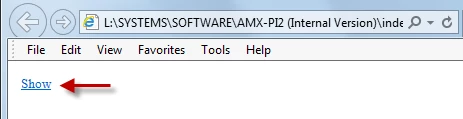
I would like to have the TOC displayed on that initial view, without requiring users to click the "Show" link.

Again, when I view the results of the output on my local drive, the TOC is displayed. The obvious problem is, the generated help needs to reside on a network drive to be accessed by our users...

PS: The project is on my local drive, only the contents of the output folder are being moved to the network drive. Also, everything other than the TOC display seems to be working fine.

Any ideas would be greatly appreciated.

-lcarey
This topic has been closed for replies.
Correct answer johndaigle

Hi Larry

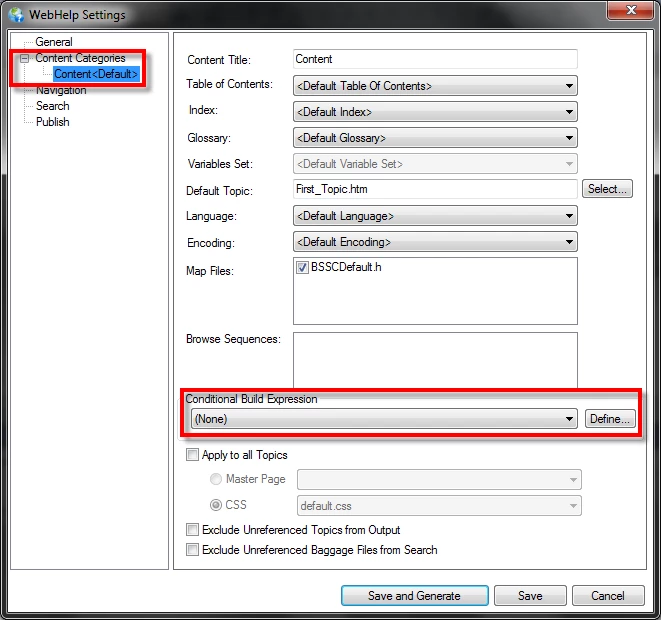
Conditional Build is possible with all outputs. It's just "in your face" more with the dialog you see with the "Pro" output.

Here is where you find in in WebHelp

Cheers... Rick


Larry, Rick has solved your conditional build issue. However, do check to make sure you have all the updates installed for RoboHelp 10.

WebHelp issues in RoboHelp versions 10 and 11

I notice you are using IE. Does the Show link occur with Chrome or Firefox as well?

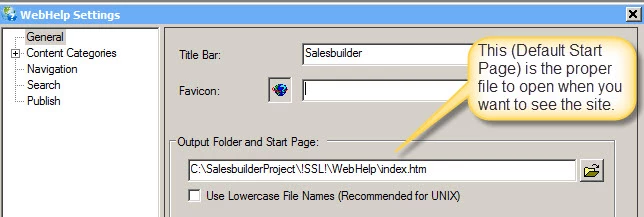
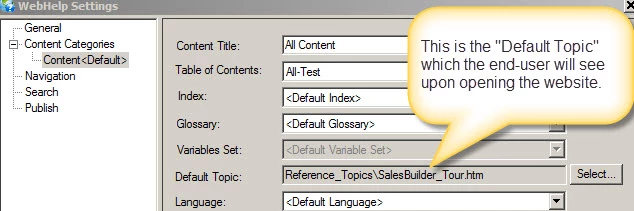
Meanwhile, I'm still suspect that you are not opening the correct "default" start page file to launch the WebHelp and that's why you're getting that "Show" link. This is "tell-tale" that you are opening the default topic file instead of the default Start Page. By chance have you somehow named your "default topic", index.html? If so, this is not correct.

john

2 replies

LCareyAuthor
Inspiring
July 28, 2014

Thanks very much John and Rick, I'm all set now!

Jeff_Coatsworth
Community Expert
Community Expert
July 25, 2014

You’re using the Pro version because you’re publishing to a RoboHelp Server instance, right? If not, then you should just be creating WebHelp.

johndaigle
Legend
July 25, 2014

Hi, lcarey. To elaborate on what Jeff said, if you are using RoboHelp Server (and my guess is that you are not), it is not correct to "copy/paste" to a network drive. WebHelp Pro ("Pro" is exclusively used for "RoboHelp Server" only) output must be published to a web server that has the Adobe RoboHelp Server database application installed on it and published from within the RoboHelp Client.

Based on the scenario you described, I'd generate again with WebHelp as your Single Source Layout. In that scenario, you can easily copy/paste your Webhelp output to a network drive. BTW, the "Show" link suspiciously reminds me of a case where the initial link that is being opened is from the "default TOPIC file" and not the default root of the WebHelp structure. These two "defaults" are often confused.

The real root (or default website file) is typically index.html or default.htm, whereas the "default Topic" file is whatever the author decides should be the first topic to be presented when the end-user opens the website.

Let us know if this helps.

Thanks

John Daigle

Adobe Certified RoboHelp and Captivate Instructor

Evergreen, Colorado

www.showmethedemo.com

John DaigleAdobe Certified RoboHelp and Captivate InstructorNewport, Oregon
LCareyAuthor
Inspiring
July 25, 2014

Thanks for the reply, and John and Jeff,you are both correct: I am using the WebHelp Pro layout, but not publishing to a RoboHelp Server, but that's because I need to support conditional build expressions. I don't see that WebHelp provides that option. Is there a way to use conditional build expressions without using the WebHelp Pro layout?

Also, just as a test I generated my project as WebHelp, and I still have the same issue - a "show" link where the TOC should be.

I'm thinking my problem is related to your "default TOPIC file vs. the default root of the WebHelp structure" point. I'm afraid I'm confused on this.

As it stands, the topic that I want to open as the "homepage" is titled "index.htm".

I have set the "Output Folder and Start Page" property (in the WebHelp Settings dialog)  to "C:\AMX Docs\AMX-PI2\v1.0\!SSL!\WebHelp\index.htm". I think I've got this all mucked up, but how to get back on track?

Thanks again

-lc