
Participating Frequently
February 2, 2011
Question

Toolbar buttons name

  • February 2, 2011
  • 1 reply
  • 797 views

Hi,

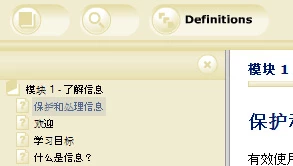
I have two question regarding the Toolbar buttons name:

1. Is there a way to change the name of Toolbar buttons contents, glossay, index etc?

    I can't find out where in RH8 I should be looking for how to set the name, if I would like to change the default names.

2. I'm using Chinese (simple) as language in one project but the Toolbar buttons won't display them, the come empty when published.
Kind Regards Chris

This topic has been closed for replies.

1 reply

Mayank_Agrawal
Participating Frequently
February 18, 2011

Here are responses to your questions

1. You can edit the LNG File to achieve desired toolbar button names.

     (i)   Go to File->Project Settings to open Project Settings dialog.

     (ii)  In "General" tab, click "Advanced" button to open "Advanced Settings for Localization" dialog.

     (iii) Scroll down to section with the name "[Common]"

     (iv) Edit the button names as per your requirement or any other string in the dialog.

2. For this issue, you may try creating a new skin through skin gallery and try generating output with the new skin.

I hope this helps

Mayank