
Toolbar font size buttons
In our WebHelp toolbar, we're trying to add buttons for enlarging and reducing the size of the font used to display the help content.
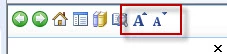
We've got the buttons added to the toolbar, but we can't get them to execute our script, which looks like this:
function resize(multiplier) {
if (document.body.style.fontSize == "") {
document.body.style.fontSize = "1.0em";
}
document.body.style.fontSize =
parseFloat(document.body.style.fontSize) +
(multiplier * 0.2) + "em";
}
We tested the script in a non-RoboHelp HTML page, and it worked fine:
<script type="text/JavaScript" src="fontSize.js"></script>
<p><img id="plustext" src="Bigger.jpg" width="15px" height= "15px" onclick="resize(1)" />
<img id="minustext" src="Smaller.jpg" width="15px" height= "15px" onclick="resize(-1)" /></p>
<p>Text Sizing</p>
We then attached the script to the button using the Inline JaveScript option, and for the button's OnClick action have used the function call resize(1), like this::
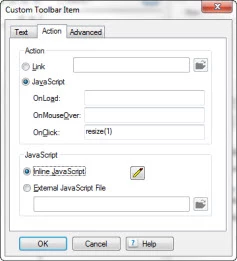
But it just won't work. Any ideas, anybody?
Thanks in advance.
--Clay


 AdChoices