


Inspiring
May 21, 2021
Answered

Topic not appearing in Review Pane

  • May 21, 2021
  • 3 replies
  • 297 views

Hi, Everyone.


I've just created a new topic. But even after rebooting RH 2020.4.173, the new topic does not appear in the Review Pane.


It might be because I've created the new topic in an unsanctioned way. Here's what I did:


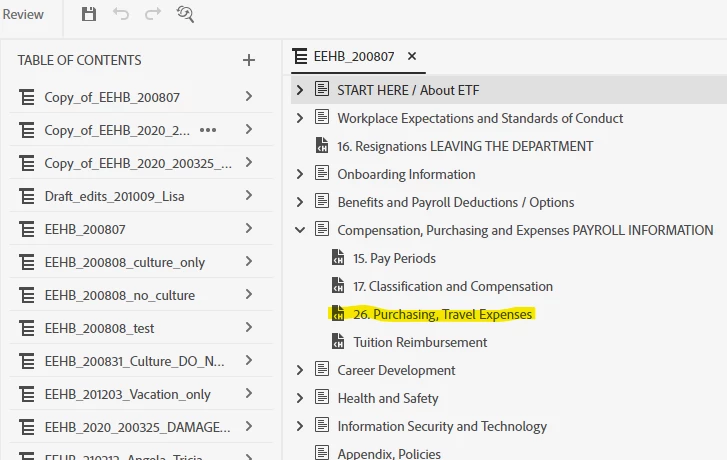
  1. Copied (ctrl + C) a topic in the TOC (yellow, Screenshot 1)
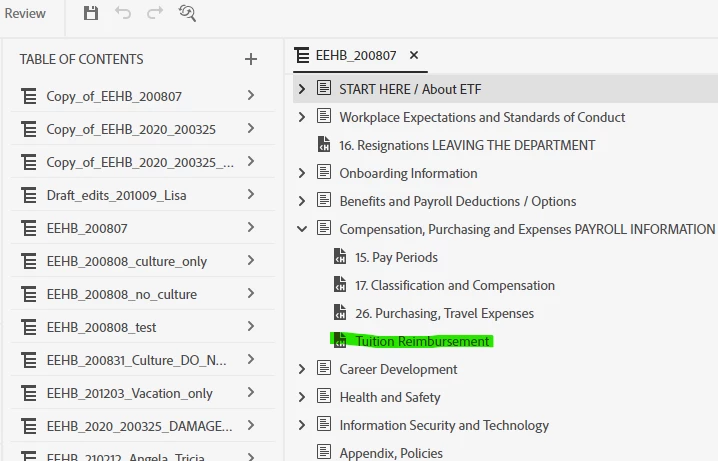
  2. Pasted it into the TOC; renamed it "Tuition Reimbursement" (green, Screenshot 2)


SCREENSHOT 1:
 

SCREENSHOT 2
 

That's probably not the proper way to create a new topic. My new "Tuition Reimbursement" topic does not appear in the Contents Pane. But I created it that way (copy-and-paste) for efficiency -- the layout and formatting is copied from the original. 


Any advice for me?  Thank you!


    This topic has been closed for replies.
    Correct answer Amebr

    If you copied then pasted an entry in the TOC, you didn't create a new topic. You only created a new TOC entry that points to the old topic.


    I don't have access to RH2020 right now, but in RH2019 you can't create a new topic in the table of contents. As far as I'm aware, you have to create new topics in the Contents area then add them to the TOC.


    As I said, I don't have RH2020 at the moment, but the help does not suggest creating a topic has been added as an option (it only mentions Insert Topic, which appears to only allow adding an existing topic to the TOC.)

    3 replies

    Inspiring
    May 24, 2021

    Hi Amber and Peter.


    Amber's explantion is correct. I was merely trying to create a new topic in this project. And I now understand I was doing it wrong. Trying to create a topic in the TOC editing pane merely creates a new TOC item, not an actual topic. 


    Instead, I should have duplicated a topic in the Contents pane and used that as my new topic.


    I'm good, now. Thanks to both of you!

    AmebrCommunity ExpertCorrect answer
    Community Expert
    May 24, 2021

    If you copied then pasted an entry in the TOC, you didn't create a new topic. You only created a new TOC entry that points to the old topic.


    I don't have access to RH2020 right now, but in RH2019 you can't create a new topic in the table of contents. As far as I'm aware, you have to create new topics in the Contents area then add them to the TOC.


    As I said, I don't have RH2020 at the moment, but the help does not suggest creating a topic has been added as an option (it only mentions Insert Topic, which appears to only allow adding an existing topic to the TOC.)

    Peter Grainge
    Community Expert
    Community Expert
    May 22, 2021

    Are you trying to add a topic to an existing review? I don't think that can be done.

    ________________________________________________________
    See www.grainge.org for free Authoring and RoboHelp Information

    Use the menu (bottom right) to mark the Best Answer or Highlight particularly useful replies. Found the answer elsewhere? Share it here.