
Known Participant
September 4, 2015
Answered

Topics appear twice in the Topic List, however, each exists only once in the project.

  • September 4, 2015
  • 1 reply
  • 870 views

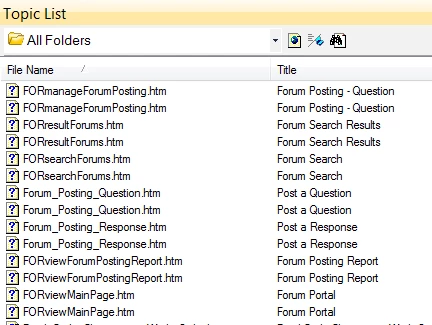
Some topics appear twice in the Topic List, but each exists only once in the project files. What causes this to happen and what can i do to prevent it? I'm using RH 11.0.4.291. I've deleted the CPD file.

Here is an example:
This topic has been closed for replies.
Correct answer Peter Grainge

Change from All Folders to a specific folder for say the first item. There cannot be two files in the same folder as Windows does not allow that. My guess is that the duplicates are in different folders and changing the folder will help you locate the original and the duplicate.

Also open both from the Topic List. Does one have red squares in it? If so you have somehow got an output into to the source.

Post back with what you find.


See www.grainge.org for RoboHelp and Authoring tips

@petergrainge

1 reply

Peter Grainge
Community Expert
Peter GraingeCommunity ExpertCorrect answer
Community Expert
September 5, 2015

Change from All Folders to a specific folder for say the first item. There cannot be two files in the same folder as Windows does not allow that. My guess is that the duplicates are in different folders and changing the folder will help you locate the original and the duplicate.

Also open both from the Topic List. Does one have red squares in it? If so you have somehow got an output into to the source.

Post back with what you find.


See www.grainge.org for RoboHelp and Authoring tips

@petergrainge

Use the menu (bottom right) to mark the Best Answer or Highlight particularly useful replies. Found the answer elsewhere? Share it here.
brickerdAuthor
Known Participant
September 8, 2015

Thank you, Peter. You got my thinking on the right path. I found the duplicate files by comparing file paths (Topic Properties/File) for each file. A Windows search of the project by file name for one of the duplicate topics would also work.

Captiv8r
Legend
September 8, 2015

Just remember that while you are free to locate the duplicates using Windows Search, you only ever want to delete one of them using RoboHelp.

Cheers... Rick