January 28, 2011
Answered

Topics marked with conditional tags still appear in documentation

Hi All,

I have a big issue with RoboHelp 7.

I define a new conditional tag (I have 2 alltogether) and I mark the topics in the TOC with pertain to that conditional tag, right?

When I generate the chm file, everything is OK. The topics marked with the conditional tag do not appear in the TOC as I specified to exculde the topics marked with that conditional tag.

When I generate the documentation however, everything is still in the document though I specified that I do not want those topics to appear.

Can you please tell me what I am doing wrong, or how should I proceed correctly so that I get my expected results?

I am using Windows XP Pro, and RoboHelp is updated with all service packs.

Thank you,

Bogdan Marin

This topic is closed to new replies. Start a new post to keep the conversation going.
Peter Grainge
Peter GraingeCorrect answer
Community Expert
January 28, 2011

Right click a topic in the TOC and select Apply Conditional Build Tag. See the New / Multiple option.

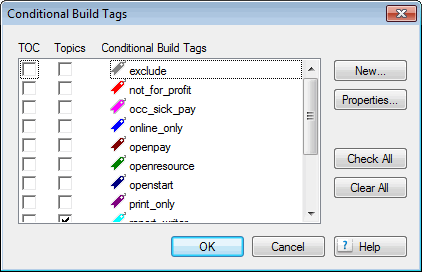
That will display this screen.

You can clearly see whether the tag is applied to the TOC or the Topic. If it is applied to the topic, it will not be in the build so the TOC entry will automatically be removed. If it is applied to the TOC only, it is still in the build.


See www.grainge.org for RoboHelp and Authoring tips

@petergrainge

Use the menu (bottom right) to mark the Best Answer or Highlight particularly useful replies. Found the answer elsewhere? Share it here.

8 replies

Willam van Weelden
Inspiring
January 28, 2011

Hi,

Setting the tag in the TOC does not exclude the topic from your output. Just from the TOC. The topics are still there. To exclude topics using CBT's, add the CBT to the topic: Open the topic properties. Go to Advanced and select the tags you want to assign to the topics. Now try creating your output again.

Greet,

Willam

Translate
January 28, 2011

Thank you William,

I will do as you say and let you know how it goes, OK?

Bogdan

Translate
Peter Grainge
Community Expert
Peter GraingeCommunity ExpertCorrect answer
Community Expert
January 28, 2011

Right click a topic in the TOC and select Apply Conditional Build Tag. See the New / Multiple option.

That will display this screen.

You can clearly see whether the tag is applied to the TOC or the Topic. If it is applied to the topic, it will not be in the build so the TOC entry will automatically be removed. If it is applied to the TOC only, it is still in the build.


See www.grainge.org for RoboHelp and Authoring tips

@petergrainge

Translate
Use the menu (bottom right) to mark the Best Answer or Highlight particularly useful replies. Found the answer elsewhere? Share it here.
Peter Grainge
Community Expert
Community Expert
January 28, 2011

Applying a tag to a TOC entry only excludes it from the TOC, not the build so those topics are still in your online help, as a search will prove.

If you don't want those topics in your printed document you have to either apply a tag to the topic and make sure the print build expression excludes them or remove them from the layout.


See www.grainge.org for RoboHelp and Authoring tips

@petergrainge

Translate
Use the menu (bottom right) to mark the Best Answer or Highlight particularly useful replies. Found the answer elsewhere? Share it here.
Willam van Weelden
Inspiring
January 28, 2011

Sorry Peter, didn't see you coming there ;-)

Translate