Known Participant
May 30, 2013
Question

Topics show up as missing in project - but display in webhelp and TOC

  • May 30, 2013
  • 2 replies
  • 712 views

Hi,

I have opened up a RH 8 project for the first time in RH 10. A few topics show up with a red 'X' on them, meaning, as far as I understand, that they're missing. I can't open these up to edit them, however, they show up OK in the generatet webhelp. So I'm wondering why RoboHelp is failing to find these files and how I can resolve this.

I found a similar thread: http://forums.adobe.com/thread/771421, but unlike that situation, my topics *are* showing up in the TOC.

When I look in the folder that holds the source topics, I see this topic there, and I can open the HTM file.

I've attached a screenshot of what I'm seeing in RH.
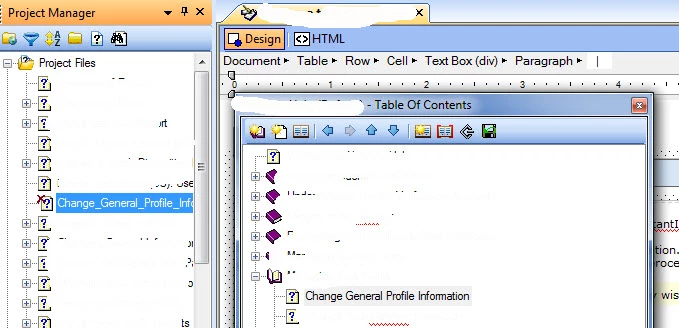
Any help is appreciated.

This topic has been closed for replies.

2 replies

Willam van Weelden
Inspiring
June 3, 2013

Hi,

In this situation you can also use my free Missing topics fix script: http://www.wvanweelden.eu/product/missing-topics-fixer

This quickly regenerates your RoboHelp project and missing topics that are still on disk are readded to the project. (Make a backup first though!)

Greet,

Willam

Peter Grainge
Community Expert
Community Expert
May 30, 2013

At the beginning you say you cannot open the files and later you say when you look in the folder you can open them. I think in the second case you are talking about Windows Explorer rather than Rh? Otherwise I am confused.

In Rh you need to import the file again and it should be OK.

You could try trashing the CPD as an alternative first.


See www.grainge.org for RoboHelp and Authoring tips

@petergrainge

Use the menu (bottom right) to mark the Best Answer or Highlight particularly useful replies. Found the answer elsewhere? Share it here.
LimizAuthor
Known Participant
May 30, 2013

Hi Peter,

I mean that I can't open the files to edit them in RH, but yes, they display well in Explorer or Chrome.

When I try to import the relevant HTM file, I get this message:

The file "C:\Users\maayli01\Documents\Docs\Online Help\rsas_Windows-html.css" does not exist on disk.

Successfully copied the file C:\Users\maayli01\Documents\Docs\Online Help\Netview Help - all changes\ChangeGenInfo.htm

Successfully copied the file C:\Users\maayli01\Documents\Docs\Online Help\Netview Help - all changes\profilegeneral.gif

Some of the imported files contained references to files which were copied to the project folder. The appropriate references were automatically updated in the files.

What do you mean by trashing the CPD? Can you explain briefly?

Thanks for your help,

Limor

Peter Grainge
Community Expert
Community Expert
May 30, 2013

The message is simply telling you what Rh has done with associated files. As long as it imported the file OK, that's the objective.

The CPD is a cache where Rh stores project information. It can be deleted via Windows Explorer or by telling Rh to always delete it on opening a project. That is done in Tools > Options.

Sometimes the cache gets mixed up and you have to delete it when Rh rebuilds it from other files.


See www.grainge.org for RoboHelp and Authoring tips

@petergrainge

Use the menu (bottom right) to mark the Best Answer or Highlight particularly useful replies. Found the answer elsewhere? Share it here.