

titimomotete
Inspiring
March 13, 2026
Answered

Topics titles are missing in PDF output

  • March 13, 2026
  • 4 replies
  • 64 views

Hi everybody,


I am creating a new webhelp with Robohelp 2022.6.34 for an online database but i am using PDF output too during trainings.


I created some topics, generating web ouput and everything fine (until now) but when i tried PDF output, i realize every topic name do not appear.

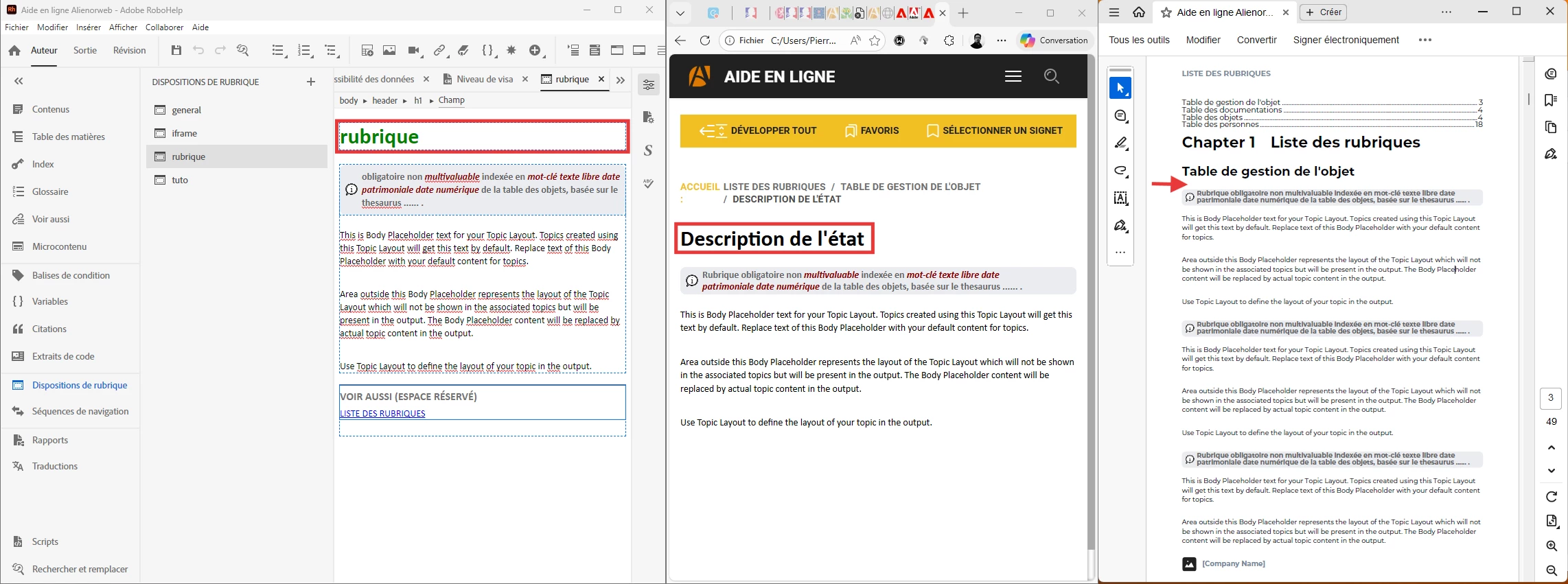
In the topic layout (“disposition de rubrique” in french screenshot), title is displayed thanks to a field :

<body>
  <div data-region="header">
    <h1><span data-field="title">rubrique</span></h1>
  </div>

That’s the green title in left part of the screenshot.


In the frameless output, the title appears (“Description de l’état” in black in the middle of screenshot)


But in the PDF output, the title is missing (where is the red arrow), in the topic and in the TOC too.


I tried many settings and searched the Internet but found nothing to help. Do any of you have an idea?


Thank you.
 

    Correct answer titimomotete

    I finally solved the problem by moving the topic title in the layout :


    It was originally placed into the header :

    <body>
      <div data-region="header">
        <h1><span data-field="title">Rubrique</span></h1>
      </div>
      <div data-region="topic">
        <p>This is Body Placeholder text for your Topic Layout. Topics created using this Topic Layout will get this text by default. Replace text of this Body Placeholder with your default content for topics.</p>
      </div>
      <div data-region="footer">
        <p> </p>
      </div>
    </body>

    I moved it outside the header, into the topic region :

    <body>
      <div data-region="header">
        
      </div>
      <div data-region="topic">
        <h1><span data-field="title">rubrique</span></h1>
        <p>This is Body Placeholder text for your Topic Layout. Topics created using this Topic Layout will get this text by default. Replace text of this Body Placeholder with your default content for topics.</p>
      </div>
      <div data-region="footer">
        <p> </p>
      </div>
    </body>


    Now the topic title (from topic properties) is displayed on frameless output and PDF output ans still dynamic (if i change the name of the topic in topic properties, the title is updated into the topic).

    Header and footer regions seems usefull only for dynamic contents like seealso relations.


    Thanks for help ​@Peter Grainge and ​@Jeff_Coatsworth 

    4 replies

    titimomotete
    titimomoteteAuthorCorrect answer
    Inspiring
    March 13, 2026

    I finally solved the problem by moving the topic title in the layout :


    It was originally placed into the header :

    <body>
      <div data-region="header">
        <h1><span data-field="title">Rubrique</span></h1>
      </div>
      <div data-region="topic">
        <p>This is Body Placeholder text for your Topic Layout. Topics created using this Topic Layout will get this text by default. Replace text of this Body Placeholder with your default content for topics.</p>
      </div>
      <div data-region="footer">
        <p> </p>
      </div>
    </body>

    I moved it outside the header, into the topic region :

    <body>
      <div data-region="header">
        
      </div>
      <div data-region="topic">
        <h1><span data-field="title">rubrique</span></h1>
        <p>This is Body Placeholder text for your Topic Layout. Topics created using this Topic Layout will get this text by default. Replace text of this Body Placeholder with your default content for topics.</p>
      </div>
      <div data-region="footer">
        <p> </p>
      </div>
    </body>


    Now the topic title (from topic properties) is displayed on frameless output and PDF output ans still dynamic (if i change the name of the topic in topic properties, the title is updated into the topic).

    Header and footer regions seems usefull only for dynamic contents like seealso relations.


    Thanks for help ​@Peter Grainge and ​@Jeff_Coatsworth 

    Peter Grainge
    Community Expert
    Community Expert
    March 13, 2026

    Well done and thanks for saving me some time tomorrow.🙂

    ________________________________________________________

    My site www.grainge.org includes many free Authoring and RoboHelp resources that may be of help.  

    Use the menu (bottom right) to mark the Best Answer or Highlight particularly useful replies. Found the answer elsewhere? Share it here.
    Peter Grainge
    Community Expert
    Community Expert
    March 13, 2026

    See if this helps.

    https://www.grainge.org/RoboHelp_Tour/rh2022/outputs/outputs_pdf.htm


    My site www.grainge.org includes many free Authoring and RoboHelp resources that may be of help.

    Use the menu (bottom right) to mark the Best Answer or Highlight particularly useful replies. Found the answer elsewhere? Share it here.
    Peter Grainge
    Community Expert
    Community Expert
    March 13, 2026

    Topics have a topic title which is not necessarily the same as the heading within the topic. Could that account for the difference?


    My site www.grainge.org includes many free Authoring and RoboHelp resources that may be of help.

    Use the menu (bottom right) to mark the Best Answer or Highlight particularly useful replies. Found the answer elsewhere? Share it here.
    titimomotete
    Inspiring
    March 13, 2026

    Well, topic title is not within the topic because it is the topic title that is displayed in the frameless output.

    Do that mean i need to retype every title manually within the topic in order to have it in the PDF ? In that case, why PDF could not do what frameless output can do ?


    Peter Grainge
    Community Expert
    Community Expert
    March 13, 2026

    When you look at a topic in a frameless output, what you see at the top of the topic is not necessarily the title. When you create a topic it defaults to the title but you can change what you see in the topic to whatever you want. If you do, then topic title and topic heading are different.

    What I am driving at is are really seeing the title or the heading?


    My site www.grainge.org includes many free Authoring and RoboHelp resources that may be of help. 

    Use the menu (bottom right) to mark the Best Answer or Highlight particularly useful replies. Found the answer elsewhere? Share it here.
    Jeff_Coatsworth
    Community Expert
    Community Expert
    March 13, 2026

    Looks like that is controlled by the PDF Preset settings and the PDF Template you choose to use - see https://www.grainge.org/RoboHelp_Tour/rh2022/outputs/outputs_pdf.htm and https://www.grainge.org/RoboHelp_Tour/rh2022/outputs/pdf_templates.htm