
Inspiring
November 26, 2019
Question

Topics with a gap at the top of the page

  • November 26, 2019
  • 11 replies
  • 559 views

This is something that has been happening seemingly randomly for a long time. Some topics have a gap at the top of the page while others start at the top as expected. Here's a side by side comparison:
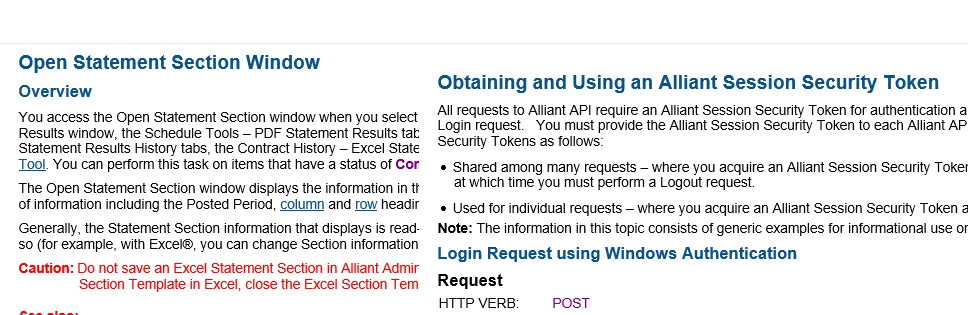
 

The headings for both of these topics use the same style and they use the same css file. I don't see anything in the html that would explain this, as far as I can tell. Anyone have any idea why some topics have a gap at the top?

This topic has been closed for replies.

11 replies

Peter Grainge
Community Expert
Community Expert
December 4, 2019

I have ascertained that the cause of the 2019 New UI could not occur in 2019 Classic so the hotfix will not help.


If you import those two topics into a new project using the same CSS, skin etc, does the problem still occur?


www.grainge.org

Use the menu (bottom right) to mark the Best Answer or Highlight particularly useful replies. Found the answer elsewhere? Share it here.
Peter Grainge
Community Expert
Community Expert
December 4, 2019

Also there is a thread about the same problem in 2019 New UI. A hotfix was released for that and there is a link to that on my site.


I have asked Adobe if that includes a fix in the Classic version but you could install that anyway if you want to go ahead.


www.grainge.org

Use the menu (bottom right) to mark the Best Answer or Highlight particularly useful replies. Found the answer elsewhere? Share it here.
Peter Grainge
Community Expert
Community Expert
December 4, 2019

Earlier I suggested trying a fresh copy of the skin. Did you try that?


If you import a good topic and a bad topic into a new project, do both remain as they were?


www.grainge.org

Use the menu (bottom right) to mark the Best Answer or Highlight particularly useful replies. Found the answer elsewhere? Share it here.
Jeff_Coatsworth
Community Expert
Community Expert
December 3, 2019

Another google search on the type= bit indicates that it might come from some HTMLHelp objects. Was any of this project reverse-engineered from a CHM? (just grasping at straws)

Another idea would be to check the source RH template files to see if any of them are messed up with this code.

CN13579Author
Inspiring
December 3, 2019

So far I've been unable to find anything in the source files that would explain it. I know some of our files have mso tags from copying from Word but when I've cleared those out it hasn't seemed to solve the issue. I'm going to keep looking for the cause but for now I can just mass search/replace from the generated files to fix it.

Jeff_Coatsworth
Community Expert
Community Expert
December 3, 2019

What was the source of the content in RH? That code looks like the remmants of some OLE linking or object embedding. 

CN13579Author
Inspiring
December 3, 2019

By comparing generated HTML5 topics with and without the gap, I found that all of the topics with the gap have the following html near the top (possible serial number edited out):


<object id="hhctrl" classid="clsid:[Possible Serial Number?]" 
 width="0" height="0" vspace="0" hspace="0" border="0" type="application/x-oleobject"></object>


I'm not sure what's putting that into the generated files. It seems random. When I remove it from the generated topic html file, the gap disappears.

Peter Grainge
Community Expert
Community Expert
November 26, 2019

Any master page involved. In the output have you tried specifying the CSS in the layout?


If that doesn't help, try taking a fresh copy of the skin you are using. You will need to give it a different name, perhaps just add "2" at the end.


www.grainge.org

Use the menu (bottom right) to mark the Best Answer or Highlight particularly useful replies. Found the answer elsewhere? Share it here.
CN13579Author
Inspiring
November 26, 2019

This is Robohelp Classic 2019, up to date. When I do a preview in Robohelp for a topic with a gap, there is no gap. I've only tried this in HTML5 output. It's the only output we use.

Peter Grainge
Community Expert
Community Expert
November 26, 2019

Which version of RoboHelp and is it up to date? There was a similar issue in 2019 fixed in an update.


Use the menu (bottom right) to mark the Best Answer or Highlight particularly useful replies. Found the answer elsewhere? Share it here.