


TopNavigation Frameless: Close Help Function
Running RoboHelp 2020.5
I need to update an existing help system (built with RH 2015, possibly older and skin is no longer supported in RH 2020) that's delivered with a web-based application. The help is opened from the web-based application by end-users. However, since the web browser is configured to hide its tabs/menu/etc. for both the web app and the help, users can't (by default) close the help and return to the app. To address this, the legacy help system was built with a custom, integrated "close help" function. Here's the actual code we used (note that it still works):
<a href="javascript:window.open('','_self').close();">
<img src="../../images/exit.png" alt="" style="border:none; margin-left:0px; margin-bottom:0px; margin-top:15px; margin-right:45px; width:100%; max-width:32px" align="right" border="0">
</a>
For the help update, I've selected the TopNavigation skin for frameless output. I'd like to add the "close help" function to the same row as the print, expand/collapse all, and remove highlight functions. I already have an icon for it:

The problem is that I can't figure out what/how/where to define/configure the function. I've tried a variety of things in the OnClick field, but none of them work. For example:
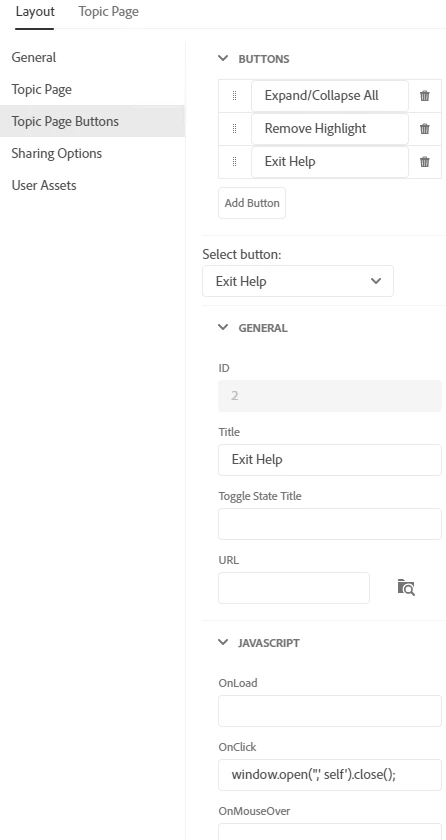
Thoughts?
 AdChoices