


Inspiring
March 23, 2021
Answered

Translation Process

  • March 23, 2021
  • 2 replies
  • 947 views

I’m encountering a couple of issues with the translation process and I wonder if someone else has also been facing some obstacles.
I’m using manual translation and more precisely I’m using the services of a translation agency. We are currently making some tests on the files…


My questions are:
1. The .toc file: Studio Trados doesn’t recognised the tags <book navtitle=”..”… as content to translate. Only the text between <title></title> is considered. So how is it supposed to be translated? Did I miss something?

The .glo file is better in that perspective. Content to be translated is identified (no link) and recognized)
2. The xliff format generated by RH: long <g> tags make the segments to be translated quite unreadable in Studio Trados. Sentences are cut and it makes it very uncomfortable to work for the translators. Here is an example. Again, did I miss something?
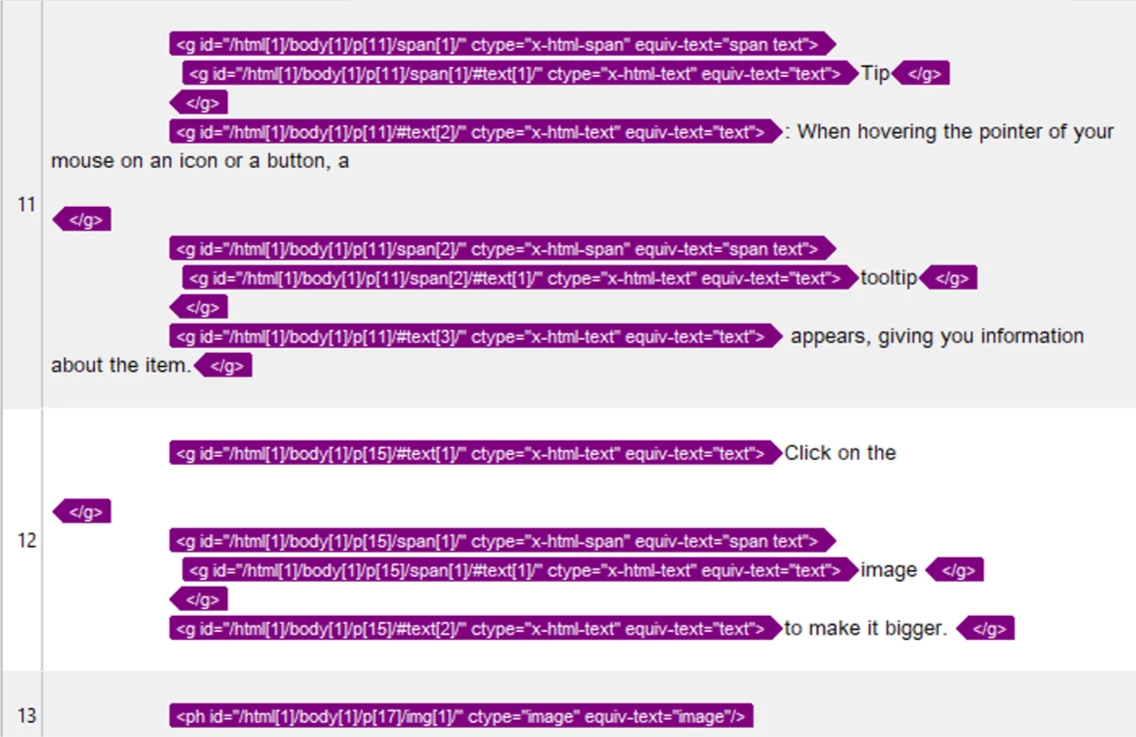

3. As the xliff are not ideal at all, we are thinking of working with HTML files (as previously). However, the keywords of the index are not recognized as content for translation either in Studio Trados. Cf. <meta> tag in the <head> and <a indexterm> (link) in the <body>. How to make sure the index is translated?


So, those 3 obstacles will force us to find some (manual) workarounds which will cost us time and energy and increase the risk of errors.
Are those obstacles known issues already?
Has someone a good advice that I didn't think of?

Thank you. 

    This topic has been closed for replies.
    Correct answer Sudhanshu Monga

    Hi Sandra42

    1. The .toc is not a standard format for translation, you have to convert .toc file to .xliff file and then send that file over to your vendor for translation. Our html-to-xliff transformer will extract the translatable content out of the .toc file and put it in the .xliff file. Open your translation file, then click on the "Author" tab, select the toc file in the table, and hit export.  So if you were directly sending .toc file for translation, please convert it to .xliff first.
    2. We have resolved the issue pertaining to extraneous <g> tags in the xliff file in update 4, so you won't be seeing much of <g> tags now, making the xliff file cleaner, and more readable. I think there might be some setting/option to turn off the showing of attributes on the <g> tag, which makes it cover most of the line.
    3. Index and Search keywords are specially handled when the HTML file is converted to .xliff file, so are other meta tags that have translatable content.

      All the above-mentioned issues are known and have been dealt with in update 4. 

    2 replies

    Peter Grainge
    Community Expert
    Community Expert
    March 26, 2021

    Update 4 is now available via Help > Updates.

    ________________________________________________________
    See www.grainge.org for free Authoring and RoboHelp Information

    Use the menu (bottom right) to mark the Best Answer or Highlight particularly useful replies. Found the answer elsewhere? Share it here.
    Sandra42Author
    Inspiring
    March 26, 2021

    Super duper!  Thank you ! 

    Sudhanshu MongaCorrect answer
    Adobe Employee
    March 23, 2021

    Hi Sandra42

    1. The .toc is not a standard format for translation, you have to convert .toc file to .xliff file and then send that file over to your vendor for translation. Our html-to-xliff transformer will extract the translatable content out of the .toc file and put it in the .xliff file. Open your translation file, then click on the "Author" tab, select the toc file in the table, and hit export.  So if you were directly sending .toc file for translation, please convert it to .xliff first.
    2. We have resolved the issue pertaining to extraneous <g> tags in the xliff file in update 4, so you won't be seeing much of <g> tags now, making the xliff file cleaner, and more readable. I think there might be some setting/option to turn off the showing of attributes on the <g> tag, which makes it cover most of the line.
    3. Index and Search keywords are specially handled when the HTML file is converted to .xliff file, so are other meta tags that have translatable content.

      All the above-mentioned issues are known and have been dealt with in update 4. 
    Sandra42Author
    Inspiring
    March 23, 2021

    Hi Sudhanshu, 

    Thank you for your reply. 

    So I did indeed miss something (doh!): the Author tab.   Ok, I get it now.

    Update 4 sounds good to me :-).  When is it released?  Hopefully I can wait for it.... 


    Adobe Employee
    March 23, 2021

    It is about to get released, give it a week's time.