
Known Participant
August 19, 2011
Question

Tri-Pane Buttons and TOC do not appear in CHM when using Custom Buttons

  • August 19, 2011
  • 2 replies
  • 1933 views

Hi all. When I include custom jump buttons in the Advanced Window Properties of my HTML Help window, the TOC window/pane and the Forward, Back, etc. buttons do not show up in the resulting Help (CHM) window. I believe I've configured everything correctly, because if I remove the jump buttons labels and URL's from the dialog box, I get a resulting help (.chm) window with the TOC and buttons (e.g. Forward, Back, Print, etc.) that I expect. FYI, I'm using RoboHelp HTML 9 (RH9) as part of TCS3, on Win7 64-bit.

So I have either found a bug, or don't understand how to properly configure 'tri-pane' windows in RH9. The Help says the following about using the custom buttons: "Custom windows without a navigation pane do not support custom buttons. If you select options such as Back, Forward, or Hide/Show, these buttons do not appear when you test Help topics." So this makes me think it's my 'mistake', but why do the proper 'tri-pane' buttons/content show up if I simply remove the custom buttons? Also, if it is my mistake, how do I 'properly' configure the tri-pane window options/windows to enable these jump buttons?


Here's some pictures of my window specification (the 'Window Properties (HTML Help)' and 'Advanced Window Properties' dialog boxes):
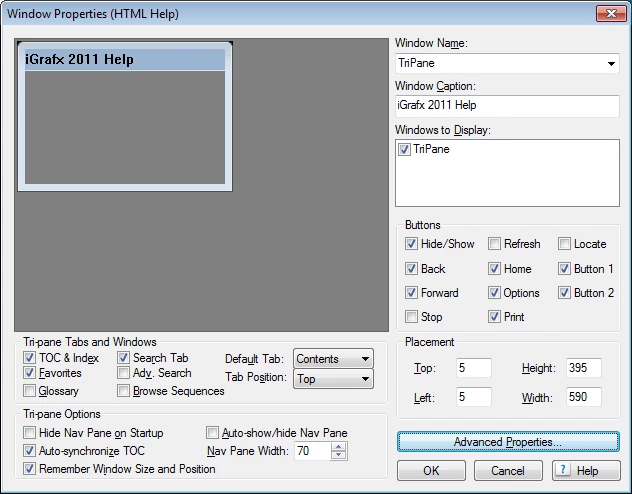
(note that I put a 'Nav Pane Width' of 70 thinking the problem was that the default was zero; I'm not wedded to this value).
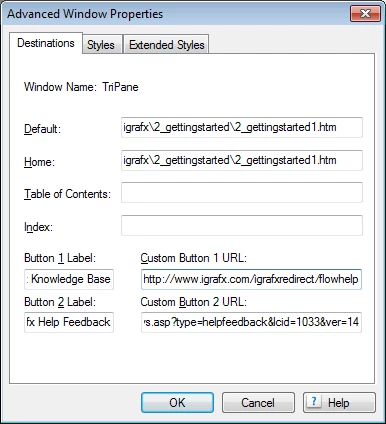
Note that I do get compiler errors when using the above custom buttons, but that did not cause a problem when I complied the CHM myself using Microsoft's HTML Help application. However, I cannot use the MSFT compiler directly, because RH9's output is XML and not HTML, and the compiler chokes on it.

If this is a bug, I'd like some confirmation of that before I submit to Adobe (and if it's not, pointers on how to get my custom buttons are appreciated).


Thanks,


Kim

This topic has been closed for replies.

2 replies

Known Participant
July 26, 2013

FYI, this is a bug (or limitation in RoboHelp ), and Adobe sent me a DLL to fix it.

The issue is with 'long' URLs for the Jump buttons. For example, my URLs were http://www.igrafx.com/igrafxredirect/flowhelpsys.asp?type=knowbase&lcid=1033&ver=15 and http://www.igrafx.com/igrafxredirect/flowhelpsys.asp?type=helpfeedback&lcid=1033&ver=15 (Jump button text of "iGrafx Knowledge Base" and "iGrafx Help Feedback" respectively).

Captiv8r
Legend
August 19, 2011

Hi Kim

Can you also show us images of what the compiled CHM looks like each way?

Additionally, I'm hoping you aren't expecting to supply your own button images in those fields where you type the URL. It's never been totally clear that it's basically impossible to supply our own custom button images for these.

Don't sweat the fact that you see warning messages upon compiling. That's a Microsoft compiler thing and is to be expected when you have external links there. Basically the compiler is attempting to resolve the external links. (With a CHM, everything is expected to be internal).

Cheers... Rick

Helpful and Handy Links

RoboHelp Wish Form/Bug Reporting Form

Begin learning RoboHelp HTML 7, 8 or 9 within the day!

Adobe Certified RoboHelp HTML Training

SorcerStone Blog

RoboHelp eBooks

Known Participant
August 19, 2011

Hi Rick,

First, what the CHM looks like without the custom buttons defined (this is how I want it to look, except of course that the custom buttons don't because I didn't define them yet ;-):

Now with the custom buttons defined; notice the TOC and buttons that were there before are gone:

I am not trying to customize the image for the button.

The message from the compiler about the custom buttons are Errors, not Warnings. However, when compiling before in MSFT's tool directly (instead of through RH9), I could ignore those errors; they simply said the target of the URL wasn't compiled (which is fine; don't want it compiled into the help). So, yes, I'm trying not to worry that they're errors in the RH9 output view, as it makes sense the target URL wasn't compiled.

Thanks,

Kim

p.s.: [EDIT] I should add that, while I don't want to do without these buttons, it's not critical I have them (I'm actually more worried about other issues, which I may post separately on ). I'm more looking for some validation before I submit a bug report; though would be fine w/finding out I did something wrong as long as it means I can get the custom/jump buttons to show up relatively easily.

Message was edited by: Kim A Scott

Captiv8r
Legend
August 19, 2011

Hello again

I just tested by compiling a CHM and configuring the two optional buttons. Worked just dandy on my own PC.

Sometimes I see that the Window settings either haven't ever truly been configured, or for some reason the settings get clobbered. Much of that setup with buttons and all is dependent on certain bits being turned off or on. So perhaps an odd calculation caused havoc to be wreaked.

I might suggest creating a totally new CHM window and defining the desired attributes. Then ensure your SSL recipe points to the window.

Give that a shot and let us know how you get on.

Cheers.. Rick

Helpful and Handy Links

RoboHelp Wish Form/Bug Reporting Form

Begin learning RoboHelp HTML 7, 8 or 9 within the day!

Adobe Certified RoboHelp HTML Training

SorcerStone Blog

RoboHelp eBooks