Inspiring
July 8, 2011
Question

trouble with error message

  • July 8, 2011
  • 1 reply
  • 656 views

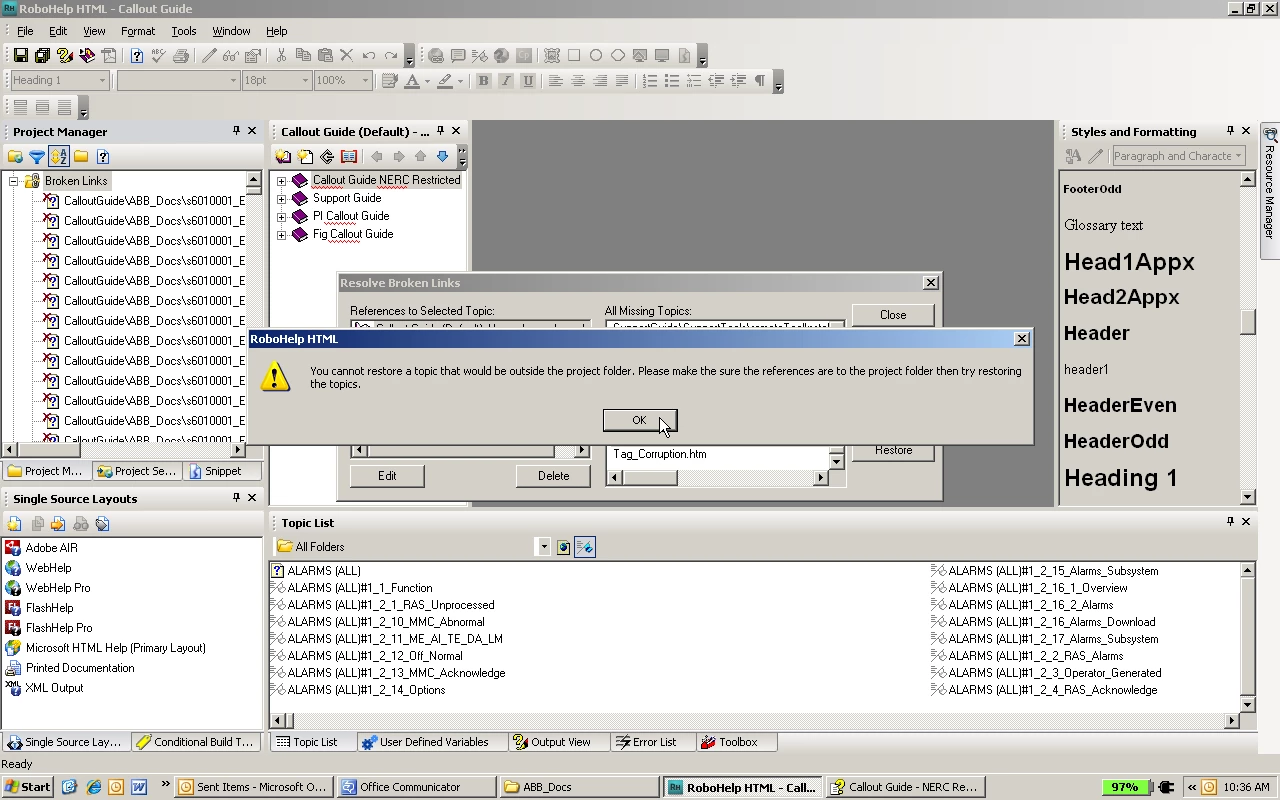
I'm using RH8 and have many broken links in my project. See the error message I'm receiving when I try to resolve the links:

This topic has been closed for replies.

1 reply

RoboColum_n_
Legend
July 8, 2011

The error message is a good one in that it describes the reason why you can't restore the link to your topics. Broken links are normally caused by someone moving / renaming topics from outside RoboHelp. Check that this has not happened. If it has, you'll have to restore things back to the way they were.


  The RoboColum(n)   @robocolumn   Colum McAndrew
luviola10Author
Inspiring
July 8, 2011

Actually I added a new folder after c:\GRHelp named SCADA Callout Guide. I did because I had all the project folders under c:\GRHelp, as if GRHelp were the name of the project. I copied everything in c:\GRHelp and moved it under SCADA Callout Guide.

I felt I needed to do this because I want to be able to place other projects under the folder GRHelp. See pic:

Community Expert
July 11, 2011

I think that you may have broken the project folder layout?

For example, the error says "CalloutGuide\ABB_Docs" but I can see an "ABB_Docs" folder directly under "SCADA Callout Guide".

Additionally, the path seems to continue with  "s6010001..." and in the second picture I think I can see a similar folder which is also at the same level as CalloutGuide.

Do you have a backup of the project before you moved it? If you haven't moved the project correctly, a backup will be the quickest way of getting everything correct. If not, you will have to manually move the folders into the correct place.

DISCLAIMER: my conclusion is based on partial screenshots - your folder setup may be correct but I can't tell from looking at the images provided. You need to check your paths before moving anything else, to determine if indeed the folders and files are in the wrong locations.