
Known Participant
July 22, 2011
Question

Trying to use Subversion with PushOK with RoboHelp 9 on Win 7 64-bit

  • July 22, 2011
  • 2 replies
  • 3078 views

Since RoboSource does not work on Windows 7 64-bit, and we have migrated to using the TC3 suite,

we have a huge source control problem on our hands.

Trying to switch from RoboSource to Subversion with PushOK using the instructions from here:

http://www.adobe.com/devnet/robohelp/articles/robohelp_subversion.html

We are not having any luck at all. Lots of errors, lots of RH9 crashes, and now this message appears:
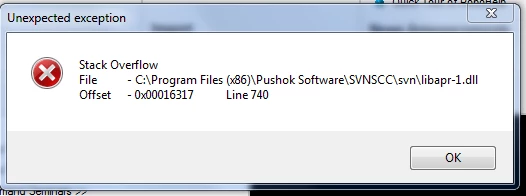
We are running Windows 7 64-bit, with RoboHelp 9 (from TC3), and running the SVNSCC x64 1.6.6.2 "PushOK".

In addition to the exception screenshot above, we also get this message "Adobe RoboHelp 9 has stopped working. A problem caused the program to stop working correctly. Windows will close the program and notify you if a solution is available."

Is there anyone that can help us? We are out of ideas and resources... Thank you.

This topic has been closed for replies.

2 replies

Known Participant
July 26, 2011

Thank you for the suggestion. How do I tell which version to install? There are only 64-bit references. Which one do you suggest that I install?

Known Participant
July 22, 2011

We also tried SVNSCC 1.6.6.2  and that did not change anything. Same errors, same problems.

July 26, 2011

Hello Saundra,

RoboHelp 9 can be integrated with 32-bit installer of PushOk Subversion client only.

It seems that you have tried with 64-bit installer of PushOk. Requesting you to try the suggested integration with 32-bit installer on a newly created project first and if this runs fine, we will try to resolve the issues with your current project.

Please share your findings. If you face any errors/issues, let us know the steps in detail.

Thanks,

Aditi

Known Participant
July 26, 2011

After opening the project, getting "stack overflow" error message twice, I deleted the CPD file and opened the project again. Then  I had broken links, so I closed the project, deleted the CPD file again and then opened the project. This time, there are no stack overflow messages and the links have all restored themselves.

I opened a topic, made a change to it and when I clicked the check in button, I got this error message:

What should I do now? It doesn't seem to be working.

Thanks for the suggestions.