
Answered
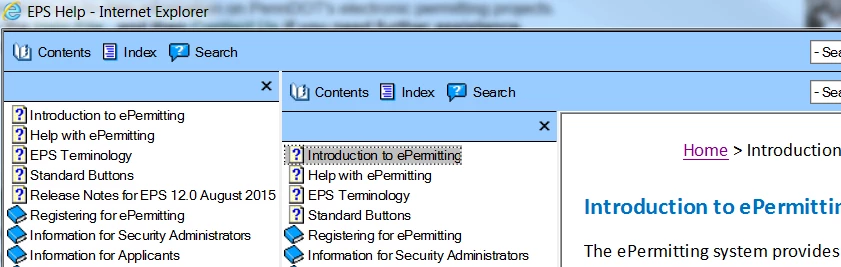
Two table of contents display for generated webhelp
I am using RH v11.0.4
This is what displays when webhelp for this project is opened. Notice that the left TOC is outdated (Release Notes for 2015); the right TOC is as it should be.
This issue is specific to one project. Other webhelp projects generate and display the TOC correctly.
I contacted RoboHelp support and gave them access to my desktop and a copy of the problem project. The support analyst couldn't identify why this issue occurred. His solution was to open Project Set-up pod and create a new window. Although I watched closely and took notes, I cannot recreate his result in my actual project.
Does anyone know what caused this issue?
Thanks
Jackie


 AdChoices