
"Überschrift 1" not recognized when importing Word document
Hi,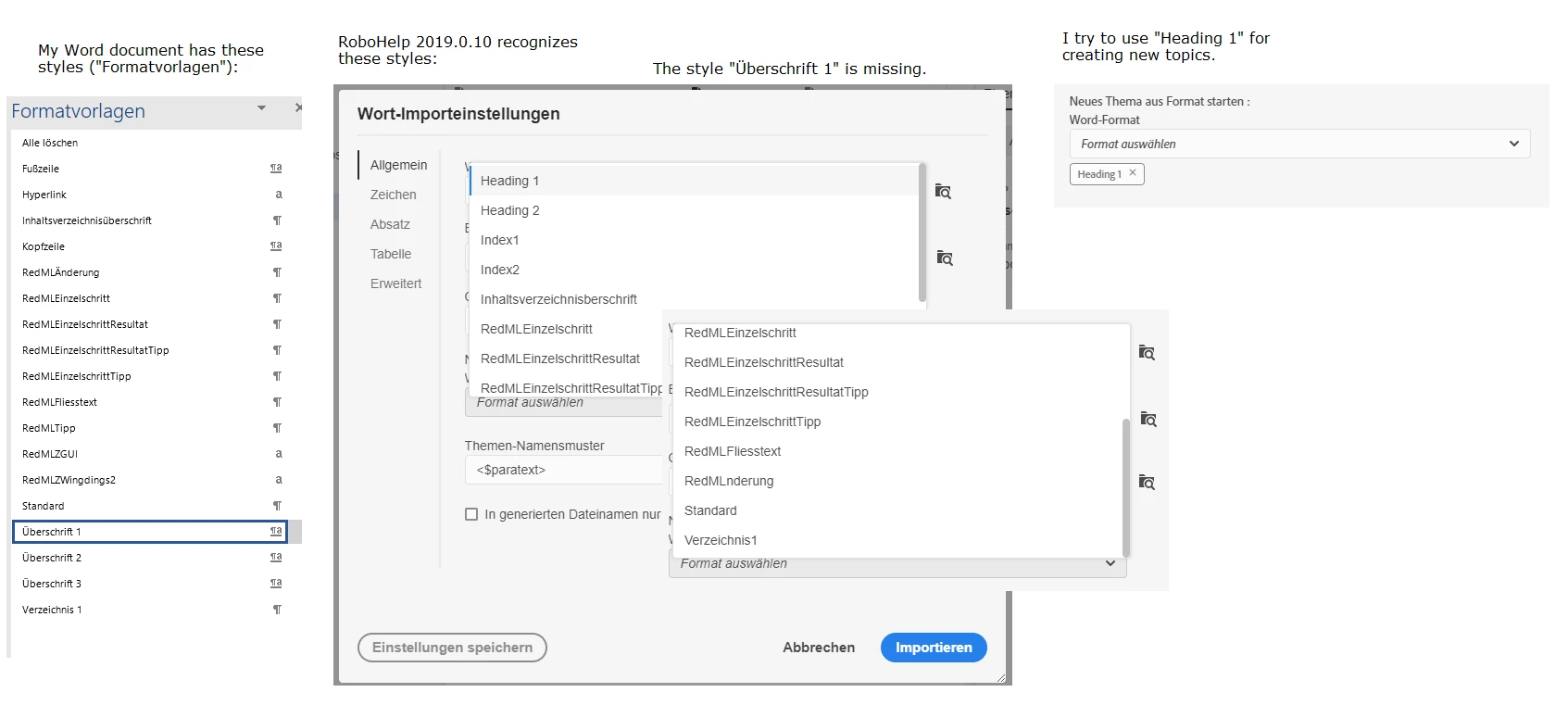
I'm using RoboHelp 2019.0.10 (with the new GUI) in German. I try to import a Word document. New topics shall be created when text in the Word document is formatted with the style "Überschrift 1", which means "Heading 1". When importing the Word document, RoboHelp does not recognize "Überschrift 1" but only "Heading 1". Compare the image WordImportProblem.png. I select the option "Neues Thema aus Format starten" (means: Start new topic with style) and select "Heading 1".
When importing my document RoboHelp does not recognize any "Heading 1" styles and does not create new topics. The reason may be: There is no style with the name "Heading 1" in my document, only "Überschrift 1".
The German Word edition always uses internally the name "Überschrift 1" for "Heading 1". I cannot change this. When RoboHelp is not able to recognize this quite important style, how can I use RoboHelp for importing Word documents?
THX
Matthias Lohrer
RedML.de


 AdChoices