

Unable to find/run broken links report in RoboHelp 2015
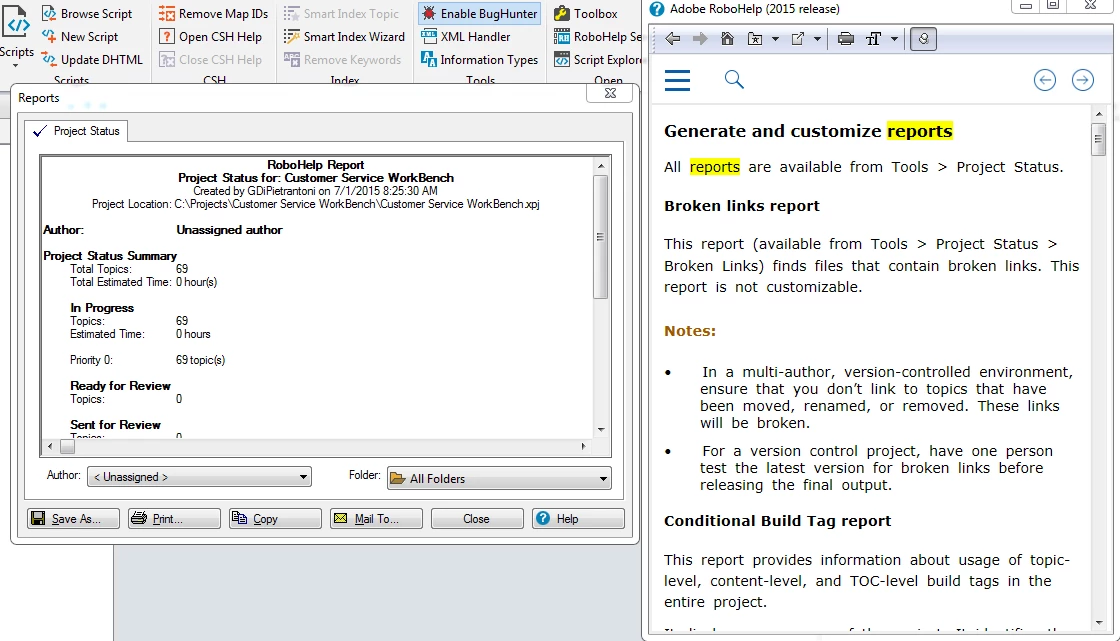
As previous posters have noted, broken links don't always register in the broken links folder. So, my superior suggested that I run a broken links report, but we couldn't find the button on the Tools ribbon. We fired up the Help function, which provided the path "Tools > Project Status > Broken Links" (see image below). Clicking the project status button on the Tools ribbon as directed opens a new window containing a project status report, but there's no option for a Broken Links report.
The Tools ribbon also features buttons for a table of contents report, topic properties report and map IDs report, but a button for the broken links report seems to be absent, not to mention buttons for a conditional build tag report, see also, index, external topics, glossary, images, etc.
Where might I find these report options, namely the "broken links report" option? Thanks!


 AdChoices