Participating Frequently
January 5, 2017
Answered

Unable to Generate XML Output After Upgrading from RH9 to RH2015

  • January 5, 2017
  • 2 replies
  • 1820 views

Hi all,

I've recently upgraded my RoboHelp software from RH9 to RH2015.

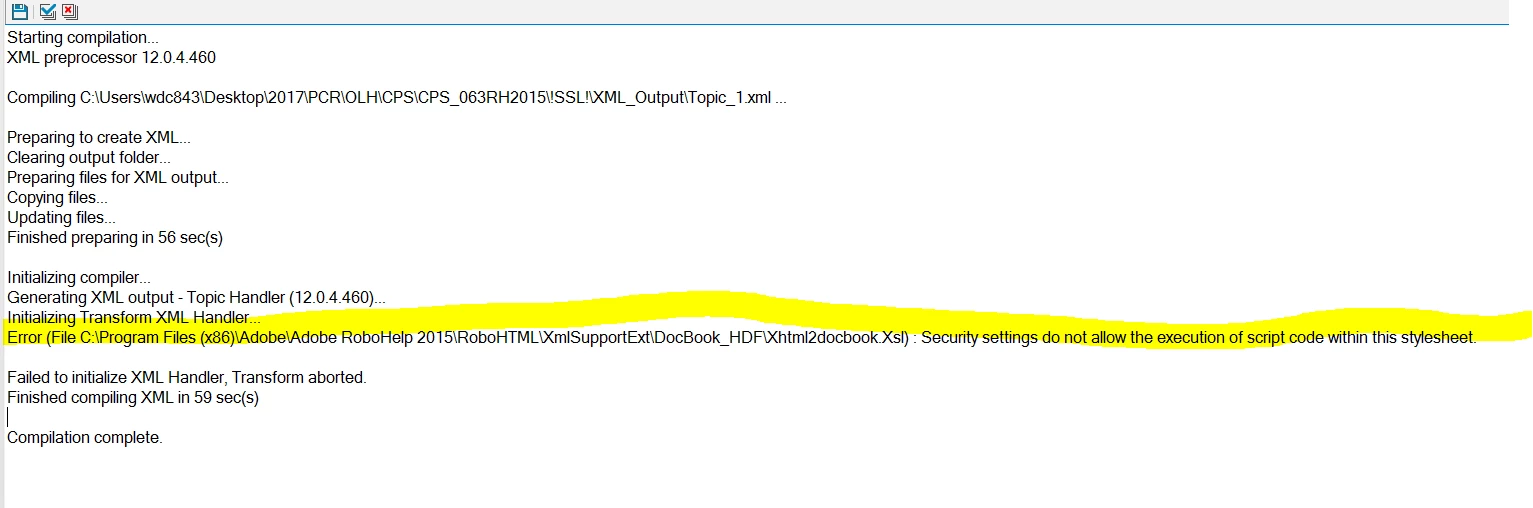
I successfully upgraded an existing RH project to RH2015. I was able to print a .chm file. But when i tried to print an xml output, i got this report:

Has anyone encountered this before? Appreciate your advice. thanks.

This topic has been closed for replies.
Correct answer erich73977905

Hi Peter,

Sorry for my super duper delayed response.

This issue is considered resolved.

I contacted the Adobe team. It is an issue from their end. The workaround is as follows:

The issue with the XML output in RH 2015 has been fixed. Please follow below steps in order to apply the fix.

  • Close RH 2015 if open.
  • Go to C:\Program Files (x86)\Adobe\Adobe RoboHelp 2015\RoboHTML rename the file “xsXmlSupportCore.dll” to “ xsXmlSupportCore_old.dll”
  • Download the file attached in the email and save it to the desktop
  • Copy the above downloaded file to  C:\Program Files (x86)\Adobe\Adobe RoboHelp 2015\RoboHTML
  • Relaunch and republish the project and check.

I think whomever that needs to resolve this issue on their end can email Adobe to get the new xsXmlSupportCore.dll (i can't upload it in here)

Thanks Peter for your consultation. I highly appreciate it. Nice to know you too, the RoboHelp guru


Thank you for this, I was having the same issue and contacted Adobe. It appears that they have fixed the issue in Robohelp 2017 (13.0.1.279). If you update to this version it works fine.

But the answer to this question is that there is something wrong with Robohelp and a fix is needed from Adobe.

2 replies

Participant
May 18, 2017

It seems that this issue hasn't been resolved in the latest edition of Robohelp 2017. I am getting this exact same error when trying to export to docbook XML.

I have also contacted Adobe. Hopefully they have a fix for their newest version of the error.

Peter Grainge
Community Expert
Community Expert
January 6, 2017

Presumably you printed the CHM using its print option. XML is simply code that developers would use to build the help into something they generate and the XML is not intended for end users. You could open it in a text editor and print it if you need to.


See www.grainge.org for RoboHelp and Authoring information

@petergrainge

Use the menu (bottom right) to mark the Best Answer or Highlight particularly useful replies. Found the answer elsewhere? Share it here.
Participating Frequently
January 10, 2017

Where i work, i have to generate two types of output: .chm and .xml. I just recently upgraded from RH9 to RH2015. generating the .chm is no problem. I cannot generate .xml though.

As you can see from the screenshot, it says something about security setting in the Xhtml2docbook.Xsl does not allow of the script code within the style setting.

so what i did was i reinstall RH9, checkout the security setting in the Xhtml2docbook.Xsl. I saw that the administrator was different. so i mimic RH9 settings to RH2015. Restarted my PC and tried to generate the XML output again, but still unsuccessful.

Peter Grainge
Community Expert
Community Expert
January 10, 2017

I misread your original post as you referred to "printing" in the text.

1. Where is your project located? Hopefully not also in Program Files.

2. Do you get the same result if you open one of the supplied sample projects?

Use the menu (bottom right) to mark the Best Answer or Highlight particularly useful replies. Found the answer elsewhere? Share it here.