
Known Participant
December 20, 2019
Question

Unable to link Book to a topic

  • December 20, 2019
  • 4 replies
  • 547 views

In RoboHelp 2019 version I'm trying to create a TOC book that is linked to a topic such that when I click on the book, the page that it is linked to appears on the right.In the new 2019 version, I don't see the 'Link to topic' check box.

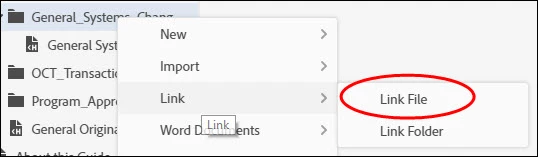
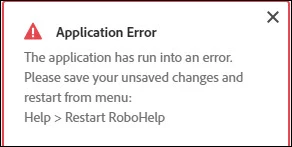
When I right-click the book and select Link File, I get an Application Error pop-up. See images attached.


This topic has been closed for replies.

4 replies

Community Expert
June 2, 2020

I can confirm it works, although if you're changing an existing linked topic the new topic doesn't display in the dialog box until you Apply and reopen. The topic is linked correctly if you generate without checking, though, so it looks like just a refresh issue.

Participant
June 2, 2020

Can anyone confirm if this still works in the most recent update (2019.0.12)? Every time I select a topic from the Source field, the link text is not saved. The only way I can do it is specify the link manually. Even in a new blank project it does not work.


Thanks,

mnairAuthor
Known Participant
December 20, 2019

Thank You, Peter! That worked.

Peter Grainge
Community Expert
Community Expert
December 20, 2019

Right click the Book. Select Properties and use the Source field.


When creating a Book, there is also an opportunity to link to a topic there.


www.grainge.org

Use the menu (bottom right) to mark the Best Answer or Highlight particularly useful replies. Found the answer elsewhere? Share it here.