
Participating Frequently
January 21, 2021
Question

Unable to open RH2020 projects after upgrade due to Application Errors.

  • January 21, 2021
  • 13 replies
  • 205 views

Hi

I upgraded to the latest version of RH2020 through the Help menu and now when I try to open a project I get a message to upgrade:
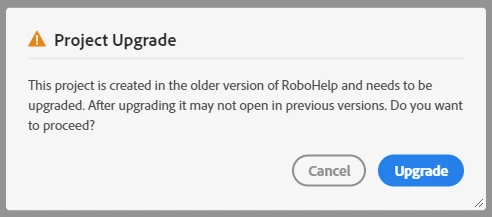
I click Upgrade and  it immediately comes up with an Application error:
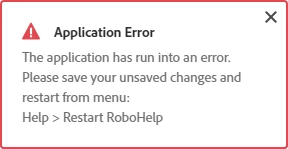
I followed the instruction but the same thing happens every time. I have tried uninstalling, downloading the latest release and re-installing but that makes no difference.


This is a major issue for me as I manage a lot of projects and I now can't get into any of them. Incidentally, the projects were all upgraded from Classic 2019 to 2020.0 without any issues and were all working fine before the latest release.


Many thanks in advance for any help with this.


    This topic has been closed for replies.

    13 replies

    Peter Grainge
    Community Expert
    Community Expert
    January 21, 2021

    Using File Explorer you will find a .rh folder. Delete what is in it but not the folder. You will lose some settings (see below) but nothing major. Back up the contents first if in doubt.


    See Opening Corrupt RoboHelp Projects (grainge.org) for details of what you will lose. The use of those items in existing topics is not affected, they just won't appear to use again until you add them back.


    Let us know when you have tried that.

    ________________________________________________________
    See www.grainge.org for free Authoring and RoboHelp Information

    Use the menu (bottom right) to mark the Best Answer or Highlight particularly useful replies. Found the answer elsewhere? Share it here.
    Participating Frequently
    January 21, 2021

    Hi Peter


    1. Compass Travel opens without issue

    2. New project created - works fine
        Closed & Re-opened - still works fine

    3. PC was shut down overnight. Tried rebooting after start up this morning. Same issue.

    Peter Grainge
    Community Expert
    Community Expert
    January 21, 2021
    1. Try the supplied About RoboHelp sample project and see if you get the same issue.
    2. Create a new project with just the default topic. Close and reopen that to see what happens.
    3. Have you rebooted the machine?


    Try those and post back.

    ________________________________________________________
    See www.grainge.org for free Authoring and RoboHelp Information

    Use the menu (bottom right) to mark the Best Answer or Highlight particularly useful replies. Found the answer elsewhere? Share it here.