

Question
'Underlying connection was closed' on adding to version control using SharePoint 2010
Certain files cannot be checked into SharePoint 2010 for version control due to file size being approximately > 100KB but same files can be uploaded via the SharePoint GUI (i.e. not within RH) and smaller files upload successfully.
Steps:
- Configure according to http://help.adobe.com/en_US/robohelp/robohtml/WS1b49059a33f77726-5aab66613798e5ec9b-8000.html
- Create new simple project and add to version control using SharePoint Connector; project is added to version control
- Files that are not uploaded are *.fla files approx > 100KB. Error message: 'The underlying Connection was Closed, an unexpected error occurred on Send'
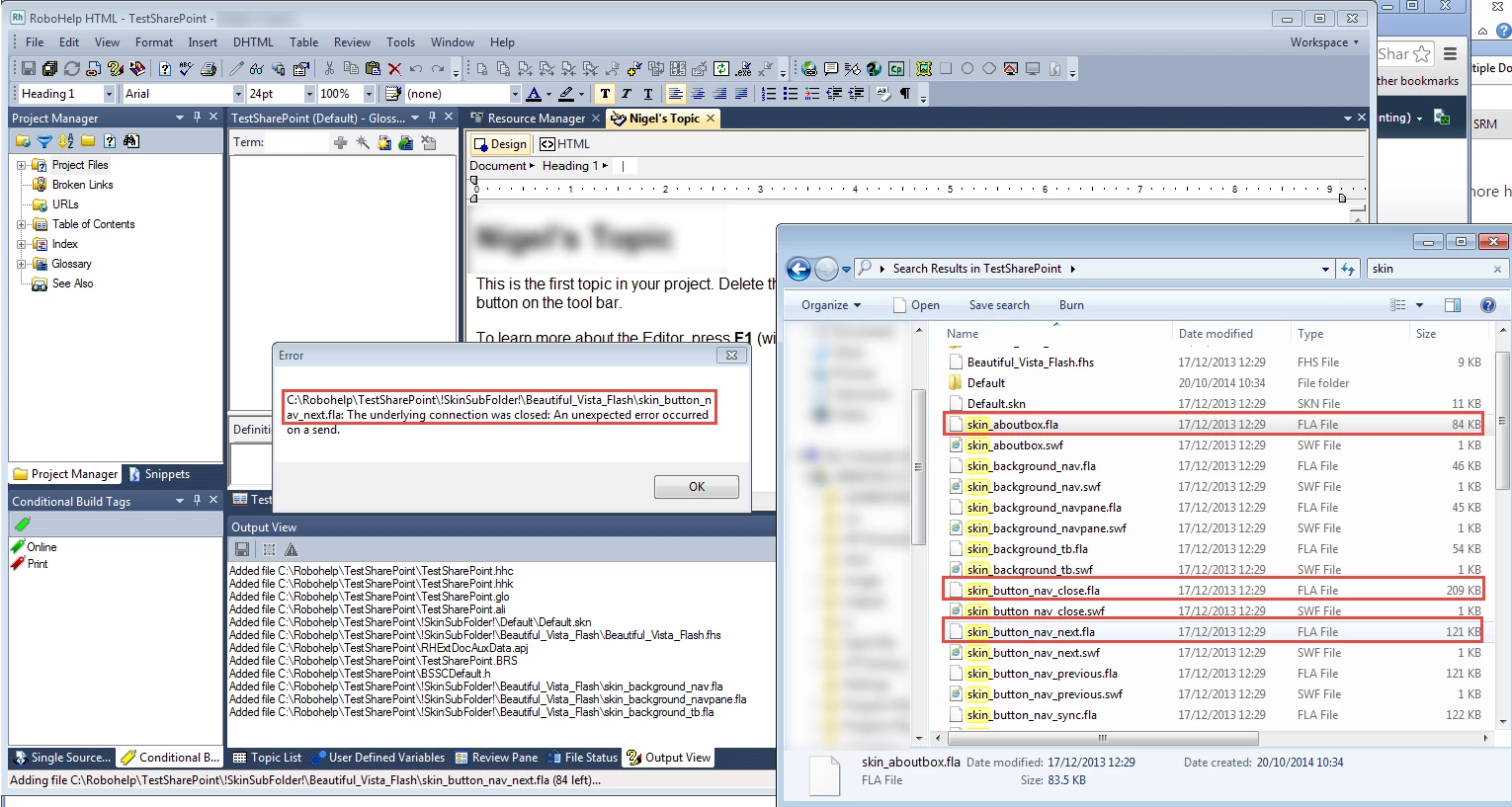
Workaround attempted:
- Open Explorer View in SharePoint 2010
- Cut and paste RH project to Shared Library/Folder
- Open project in RH (File > Open Project From Version Control)
- Make changes to topic (add body text) to increase size > 100KB
- Check in topic fails, same error message displayed
Environment: Windows 7, RH 11 (trial version), SharePoint 2010 (with Site Owner permission), VPN Connection, Windows Authentication to Source Control, WinMerge (latest version)


 AdChoices