


Inspiring
June 21, 2021
Answered

Unwanted Topic Keywords Showing in Index

  • June 21, 2021
  • 2 replies
  • 428 views

I'm using RoboHelp 2020.5.71 on Windows 10.


In my index, I have unwanted keywords showing up, even though I have a condition tag applied that should exclude it.


In the following picture, the highlighted index keyword and subkeyword should not display: 
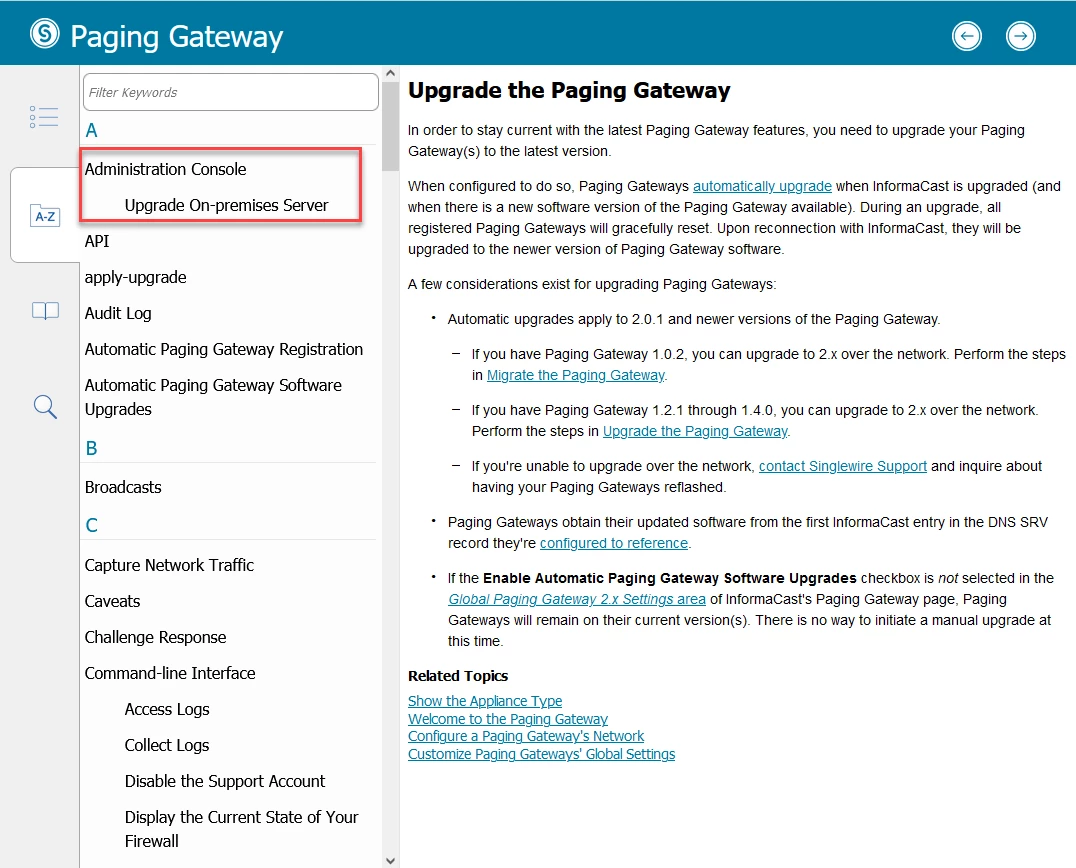
 

The topic displayed is the correct one, but it should only show up under "Paging Gateway | Upgrade" in the Paging Gateway's index, not under "Administration Console | Upgrade On-premises Server," which is only applicable for Fusion's index.


The topic is shared between Fusion and Paging Gateway, but both "Administration Console" and "Upgrade On-premises Server" have the Fusion condition tag applied to them in the index, which should exclude them from the Paging Gateway's output.


That's not what's occurring however. It's showing up in both output's index.

    This topic has been closed for replies.
    Correct answer Surbhi_Maheshwari17103204

    Hi,

    This is a bug and it will be fixed in upcoming updates. We have logged RH-9501 where you can have updates on this fix.

    Thanks for reporting this.

    Regards,
    Surbhi Maheshwari

    2 replies

    Adobe Employee
    June 22, 2021

    Hi,

    This is a bug and it will be fixed in upcoming updates. We have logged RH-9501 where you can have updates on this fix.

    Thanks for reporting this.

    Regards,
    Surbhi Maheshwari

    Community Expert
    June 21, 2021

    I did a quick test by applying "Print" to a keyword in 2019 New UI and generating Responsive HTML5 output with an expression that excluded the "print" condition. The keyword did not display in the output.


    I repeated with RH2020.5, however the keyword showed in the output. So to me this looks like it could be a bug.


    You can request features and report issues here: https://tracker.adobe.com/