

michelled60596123
Known Participant
October 30, 2019
Question

Unwanting Nested headings using Frameless skin

  • October 30, 2019
  • 10 replies
  • 691 views

Hi

I am using RoboHelp 2019.09 and generating HTML5 with a frameless output preset

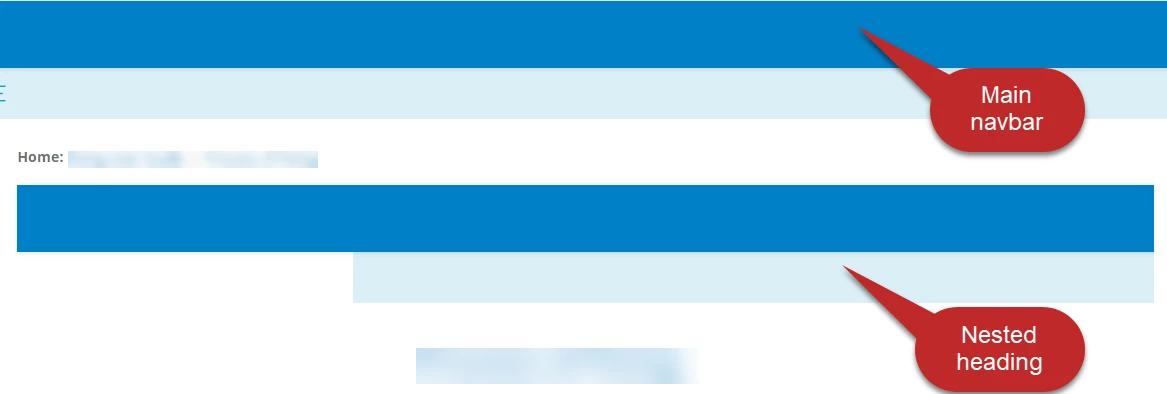
I have an issue where headings in topics are displayed in a nested way, e.g:

Not all topics are affected by this.


I have troubleshooted the css, toc, browse sequence, the HTML code and narrowed it down to the frameless output as it works as expected using HTML5 output


Does anyone have ideas of how I can fix the nested topics?


Thanks

Michelle


This topic has been closed for replies.

10 replies

Peter Grainge
Community Expert
Community Expert
December 18, 2019

Neither I nor Adobe were able to replicate this issue but Adobe did identify what they believe is the cause. Please try with Update 10 applied and let us know if the issue is now fixed.


www.grainge.org

Use the menu (bottom right) to mark the Best Answer or Highlight particularly useful replies. Found the answer elsewhere? Share it here.
Peter Grainge
Community Expert
Community Expert
November 7, 2019

Copying in the skin as a temporary solution might be OK but when you want to customise you will have the issue to clean up again.


I'm thinking if browse sequences were the issue, that would also occur when I generate your project.


www.grainge.org

Use the menu (bottom right) to mark the Best Answer or Highlight particularly useful replies. Found the answer elsewhere? Share it here.
michelled60596123
Known Participant
November 7, 2019

Update: I can remove the nesting if I build the frameless output preset without a skin or browse sequence, and then manually copy in the template folder and other assets to add the styles that I need. I am unable to easily remove the topic footer that is inserted automatically as part of the build process.

I believe that the issue relates to the browse sequence. I ensure that the browse sequence matches the table of contents file by creating a new browse sequence and dragging and dropping in the main toc. I then added that to the frameless output without skin and the resultant build had nesting issues.


Hope that is illuminating. Any other thoughts would be gratefully appreciated.

michelled60596123
Known Participant
November 6, 2019

The code only appears in the output, not in the source

michelled60596123
Known Participant
November 6, 2019

I have added the hotfix but the issues still exist. I worked with our Dev Team yesterday to eliminate TFS/GIT source control as the origin of the issue and we seem to have eliminated it from the equation. In addition, I updated Visual Studio and Git.


I can fix if it I remove the following code from the affected topics, so perhaps this will help in working backwards from the output to the source of the problem?


<div class="RH-LAYOUT-HEADER-container ">
<div class="RH-LAYOUT-HEADER-logo-box ">
<div class="logo-holder" id="logo-holder"></div>
<div class="topic-title-holder" id="topic-title-holder"></div>
</div>
<div class="search-placeholder-class" id="search-with-help"></div>
</div>


<div class="RH-LAYOUT-LEFTPANEL-container" id="rh-leftpanel"></div>

<div class="RH-LAYOUT-TOOLBAR-toolbar-box __web-inspector-hide-shortcut__" id="rh-toolbar"></div>


Peter Grainge
Community Expert
Community Expert
November 6, 2019

We established that this is an environment issue. MDDwork sent me a test project with the issue and I generated it without changing any settings other than the output path. I generated with no nesting. She then sent me her live project and we got the same result, no nesting. I sent the output to MDDwork and she saw no nesting in that. 


MDDwork is currently working with her IT folks to apply Windows updates and suchlike.


As I replied to this post, it occurs to me there may be one RoboHelp issue that could be related. Doubtful but worth a try. Adobe issued a hotfix for different issues. It is just possible that coincidentally it is why I am not seeing the issue.


https://helpx.adobe.com/robohelp/kb/hotfix-for-robohelp-update-9-2019-release.html


If you want to create a simple project with just a couple of topics for me to try, that's OK. See the Contact page on my site.


www.grainge.org

Use the menu (bottom right) to mark the Best Answer or Highlight particularly useful replies. Found the answer elsewhere? Share it here.
michelled60596123
Known Participant
November 1, 2019

I received your email, thank you. I am in the process of getting the project ready for you to take a look at.

Participant
November 6, 2019

I am also having this issue.


I'm using RoboHelp 2019.09 generating a frameless output preset with the Oceanic skin. Not all topics are have the issue and the topics affected seem to randomly change.


Has there been any progress on this issue?

Peter Grainge
Community Expert
Community Expert
November 1, 2019

Just wanting to check you did receive my reply to your direct email.


www.grainge.org

Use the menu (bottom right) to mark the Best Answer or Highlight particularly useful replies. Found the answer elsewhere? Share it here.
michelled60596123
Known Participant
October 30, 2019

It works as expected if I use the HTML5 output

Jeff_Coatsworth
Community Expert
Community Expert
October 30, 2019

Is it happening if you try another layout?