
Known Participant
December 7, 2020
質問

Upgrade from RoboHelp 10 to RoboHelp 2020 results in broken links in more than half of toppics

  • December 7, 2020
  • 返信数 15.
  • 762 ビュー

I have for many years worked with RoboHelp 10 in one company. We have now been taken over by another company and have finally invested in a newer version: RoboHelp 2020. 


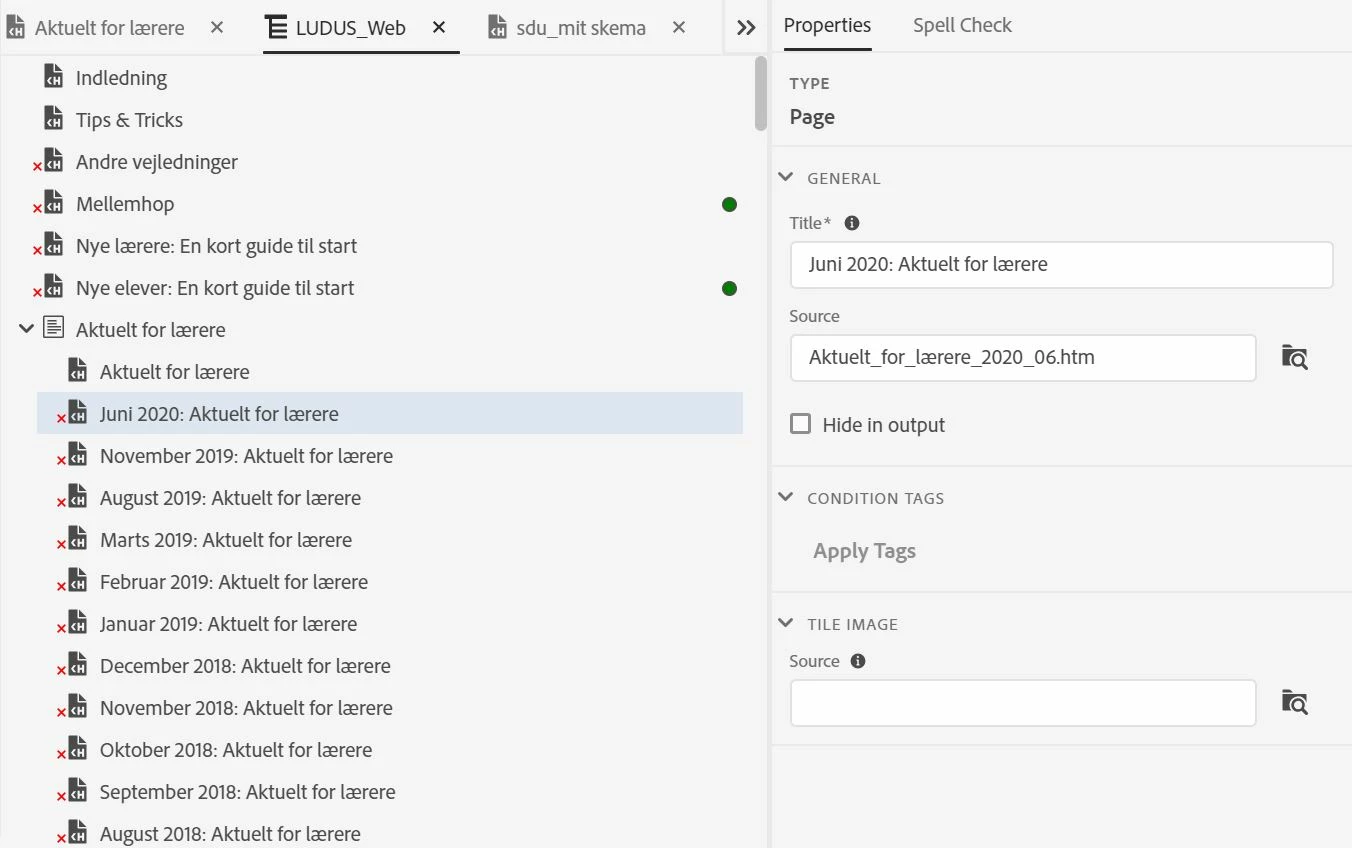
Unfortunately upgrading the project has resulted in extremely many broken topic links. Actually only a few of them have been converted properly. There are about 800 topics needing to get their link fixed and there just MUST be a better way than starting over from scratch. There were no broken links in the project before upgrading. It is only used for online help, not for print.


What can have gone wrong? What can I try to do better?
 

    このトピックへの返信は締め切られました。

    返信数 15

    Peter Grainge
    Community Expert
    Community Expert
    December 8, 2020

    The original project was controlled by VSS. The new one will be using another source control, but so far the upgrade was just stand-alone.

    Was it fully checked out of source control when you upgraded the first time? Not being checked out seems a likely cause of issues.


    I have now tried upgrading the already upgraded project. It does not seem to correct anything.

    That's not what I meant. I meant starting afresh from the project in Classic.


    The broken links report confirms the extent of the problem.

    Please look at where the broken links are? Are they mostly related to the TOC and the presets?


    ****************************************


    Also are the topics shown as missing in the TOC also not shown in the Contents panel?

    ________________________________________________________
    See www.grainge.org for free Authoring and RoboHelp Information

    Use the menu (bottom right) to mark the Best Answer or Highlight particularly useful replies. Found the answer elsewhere? Share it here.
    Known Participant
    December 8, 2020

    Q: Was it fully checked out of source control when you upgraded the first time?

    A: No, I copied the project files after checking them in. Thus the files were write protected, but RoboHelp changes that during upgrade. I will try checking everything out and then copy the folder.


    Q: Please look at where the broken links are? Are they mostly related to the TOC and the presets?

    A: I do not understand what you mean by 'presets'. The broken links are lmost entirely related to topics, according to the Broken Links report.

    Known Participant
    December 8, 2020

    Checking out before copying does not seem to make any difference.

    At least some of the htm-files related to the broken links are simply missing from the upgraded project. Is there a RoboHelp system file that might be responsible for this? If there is, can it be regenerated in the original project, for instance by deleting af file and letting RoboHelp construct it? The files missing in the upgraded project are listed in the "Used file" report in RoboHelp 10.


    Known Participant
    December 8, 2020

    I have tried upgrading to RoboHelp 2019 Classic. This upgrading process tells that there is a problem with the file root.fpj (actually VSS has reported not being able to check this file in and out).

    This XML file misses the last closing tag </rhpml>. 

    However, adding this tag does not help. Maybe this file has other errors that should be corrected? 

    Peter Grainge
    Community Expert
    Community Expert
    December 8, 2020

    The latest version is 2020.3. You do not have the latest version that was released last week. 

    ________________________________________________________
    See www.grainge.org for free Authoring and RoboHelp Information

    Use the menu (bottom right) to mark the Best Answer or Highlight particularly useful replies. Found the answer elsewhere? Share it here.
    Known Participant
    December 8, 2020

    The new version 2.30.0 does not change anything to the better.

    Peter Grainge
    Community Expert
    Community Expert
    December 7, 2020

    When I saw the email advice that doesn't include screenshots I was going to suggest that often deleting the presets (SSLs in old money) fixes many broken links that show in the Broken Links report.


    However, now that I have seen the screenshot I can see it's a TOC that is messed up. That is unusual.


    1. Any source control involved?
    2. Is the project on a local drive?
    3. Have you tried to run the upgrade process again?
    4. Have you looked in the Broken Links report to ascertain that this is the extent of the broken links?

    ________________________________________________________
    See www.grainge.org for free Authoring and RoboHelp Information

    Use the menu (bottom right) to mark the Best Answer or Highlight particularly useful replies. Found the answer elsewhere? Share it here.
    Known Participant
    December 8, 2020

    1: The original project was controlled by VSS. The new one will be using another source control, but so far the upgrade was just stand-alone.

    2: The project is on the local hard drive C:

    3: I have now tried upgrading the already upgraded project. It does not seem to correct anything.

    4: The broken links report confirms the extent of the problem.

    Jeff_Coatsworth
    Community Expert
    Community Expert
    December 7, 2020

    I stuck your image back into your post - that's the best way to see screenshots.
    What version of RH2020 have you got & upgraded with? You should use the latest build before trying to convert.

    Known Participant
    December 8, 2020

    The version is 2020.2.29 and it was just downloaded a couple of days ago.

    Thanks for adjusting my post.