Known Participant
January 26, 2022
Answered

Upgrade Robohelp 2019 Classic

  • January 26, 2022
  • 4 replies
  • 326 views

Hi There,


I upgraded a large 2019 Classic file to 2019 new UI. It went smoothly and the file is looking good so far. I just noticed in the 2019 the robohelp file in the new UI is an rhpj. 


I now able to open the file in 2019 new UI. I want to upgrade this same file to 2020. But 2020 doesn't offer an rhpj choice in the drop down. When I upgraded from Classic to new UI, shouldn't the file extention changed to XPJ?


Thanks,


Julianna

    This topic has been closed for replies.
    Correct answer Peter Grainge

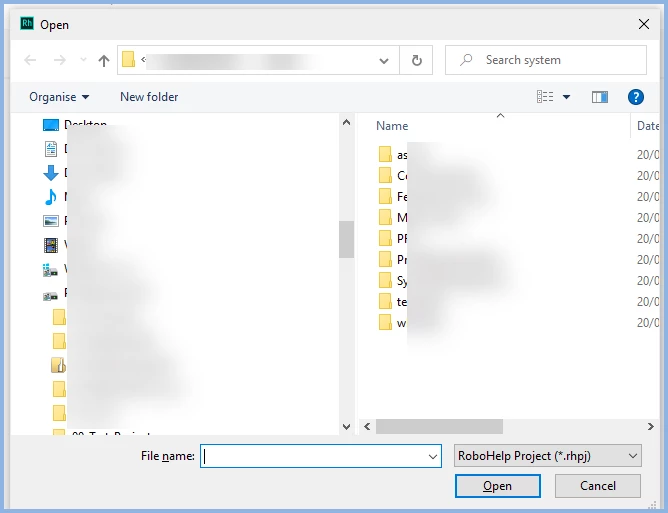
    In 2020 when I click Open Project I see this, only rhpj (RoboHelp Project)


    Upgrade Project is for Classic Projects. Projects already in 2019 New UI do not need to be upgraded.

    ________________________________________________________
    My site www.grainge.org includes many free Authoring and RoboHelp resources that may be of help.

    4 replies

    Known Participant
    January 27, 2022

    Thank you both! I'm so relieved.


    Best regards,


    Julianna

    Peter Grainge
    Community Expert
    Peter GraingeCommunity ExpertCorrect answer
    Community Expert
    January 27, 2022

    In 2020 when I click Open Project I see this, only rhpj (RoboHelp Project)


    Upgrade Project is for Classic Projects. Projects already in 2019 New UI do not need to be upgraded.

    ________________________________________________________
    My site www.grainge.org includes many free Authoring and RoboHelp resources that may be of help.

    Use the menu (bottom right) to mark the Best Answer or Highlight particularly useful replies. Found the answer elsewhere? Share it here.
    Community Expert
    January 26, 2022

    I don't think you need to do a separate "upgrade" action for RH2019 New UI projects. Just open the RH2019 New UI project in RH2020 and it is upgraded automatically. A separate step is needed for RH Classic projects because the underlying structure is completely different. (This is my non-technical interpretation, not an offical description of the reason.)

    Known Participant
    January 26, 2022

    It looks like I can't edit my message above. I can open the file in both 2019 new UI and 2020. But I can't officially update it to 2020 because the ext. drop down does not have rhpj as an option.


    Sorry for the two messages


    Thanks,


    Julianna