


Known Participant
March 11, 2022
Question

Upgrading a 2019 skin to 2020

  • March 11, 2022
  • 3 replies
  • 269 views

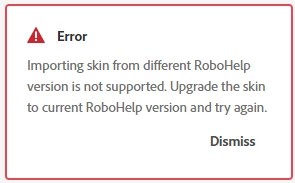
I have a skin I customized in RH 2019.0.14.  When I try to import it into RH 2020.7.46, I get an error:


I can't find any instructions on how to perform this upgrade.


I spent quite a while getting this skin exactly the way I want it. I'd hate to have to recreate it from scratch.


Can anyone point me to the procedure / tell me how to perform this upgrade?


Thank you.

    This topic has been closed for replies.

    3 replies

    Known Participant
    March 16, 2022

    Thank you all for the suggestions and advice.  I am ending up rebuilding the skin in RH 2020.7.46 since I cannot find any information about how to make the skz from 2019 work with 2020.


    I added my voice to the ticket Peter mentions below:  RH-10363 | Tracker (adobe.com)


    I even hoped to upgrade the whole project from 2019 to 2020 to see if that would make it possible, but upgrade only works for xpj projects, not rhpj files.


    A bit frustrating that they don't make the products compatible with one another....

    Peter Grainge
    Community Expert
    Community Expert
    March 12, 2022

    The only bug I can find regarding importing skins is RH-10363 | Tracker (adobe.com). That is showing as Open but using Update 7 I am able to import a skin.


    If you tried to import from Classic then I would expect that error. What you can do is upgrade a Classic project to 2020 and see what the skin looks like afterwards. Your Classic project will not be changed, the upgrade creates a new project.


    During the upgrade any customisation applied through the skin editor will be kept. If you applied any behind the scenes customisations, they will be lost through the process and I haven't been able to find any workaround for that.

    ________________________________________________________

    My site www.grainge.org includes many free Authoring and RoboHelp resources that may be of help.


    Use the menu (bottom right) to mark the Best Answer or Highlight particularly useful replies. Found the answer elsewhere? Share it here.
    Peter Grainge
    Community Expert
    Community Expert
    March 11, 2022

    When you say 2019.0.14 that could be the Classic version or the new UI, which is it?

    • If it is the new UI then it should import OK. There was a bug that gave the error message you show but I thought that was fixed so should not occur with 2020.7. I'm checking that out.
    • If it was Classic and you made customisations other than through the skin editor, then you might have a problem. I'm also checking out a workaround for that as I think there may be one. @Amebr Can you confirm that?

    ________________________________________________________

    My site www.grainge.org includes many free Authoring and RoboHelp resources that may be of help.


    Use the menu (bottom right) to mark the Best Answer or Highlight particularly useful replies. Found the answer elsewhere? Share it here.
    Community Expert
    March 14, 2022

    It's not something I've looked in to much, as my skin is not supported at all, so it will be a complete re-write when the time comes. 😛


    But perhaps this thread provides some ideas?

    https://community.adobe.com/t5/robohelp-discussions/upgrading-from-robohelp-classic-to-2019-new-ui-skin-issues/m-p/11728113