


Known Participant
March 26, 2021
Answered

Upgrading RH 2017 project to 2020 not working

  • March 26, 2021
  • 11 replies
  • 1007 views

Hi,

I downloaded yesterday the trial version of RH 2020 to see whether the upgrading of my 2017 project works correctly. The project is quite huge and contains around 18.000 files when published, I tried by opening RH 2020 and select Upgrade project. 

The process starts running but not even 20 seconds later I get the following error and the import fails, forcing me to shut down the application.
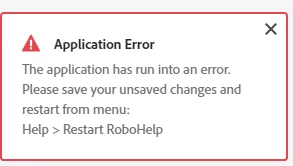
 

Could you please let me know how to tackle this issue and what could be the problem?

Thanks.

Angelica

    This topic has been closed for replies.
    Correct answer Peter Grainge

    You need to edit the CSS. It will be in Assets > CSS. Double click it to edit it. Because of the issue it may only open in source view rather than the graphical editor. 

    ________________________________________________________
    See www.grainge.org for free Authoring and RoboHelp Information

    11 replies

    Jeff_Coatsworth
    Community Expert
    Community Expert
    March 26, 2021

    Well, first make sure that you've got the newest patched version of RH2020 loaded (should show 2020.4 now) - if it shows the initial RH2020.0 release, there was a bug that prevented the normal Help > Updates mechanism from working. In that case, go to https://www.adobe.com/support/robohelp/downloads.html and grab the last patch version. If Patch 4 isn't up there yet, loading 2020.3 will enable the Help > Updates to work to boost you to patch 4.
    Then give your conversion a try again.
    If it still fails, and you installed RH2020 with Admin rights - test out opening the sample project and see if all is well. If it's ok, then the issue has to be in your project. There are troubleshooting techniques for dealing with that too.