February 13, 2011
Question

Urgent Help!! Unable to Publish.

  • February 13, 2011
  • 3 replies
  • 1100 views

Hello everyone!

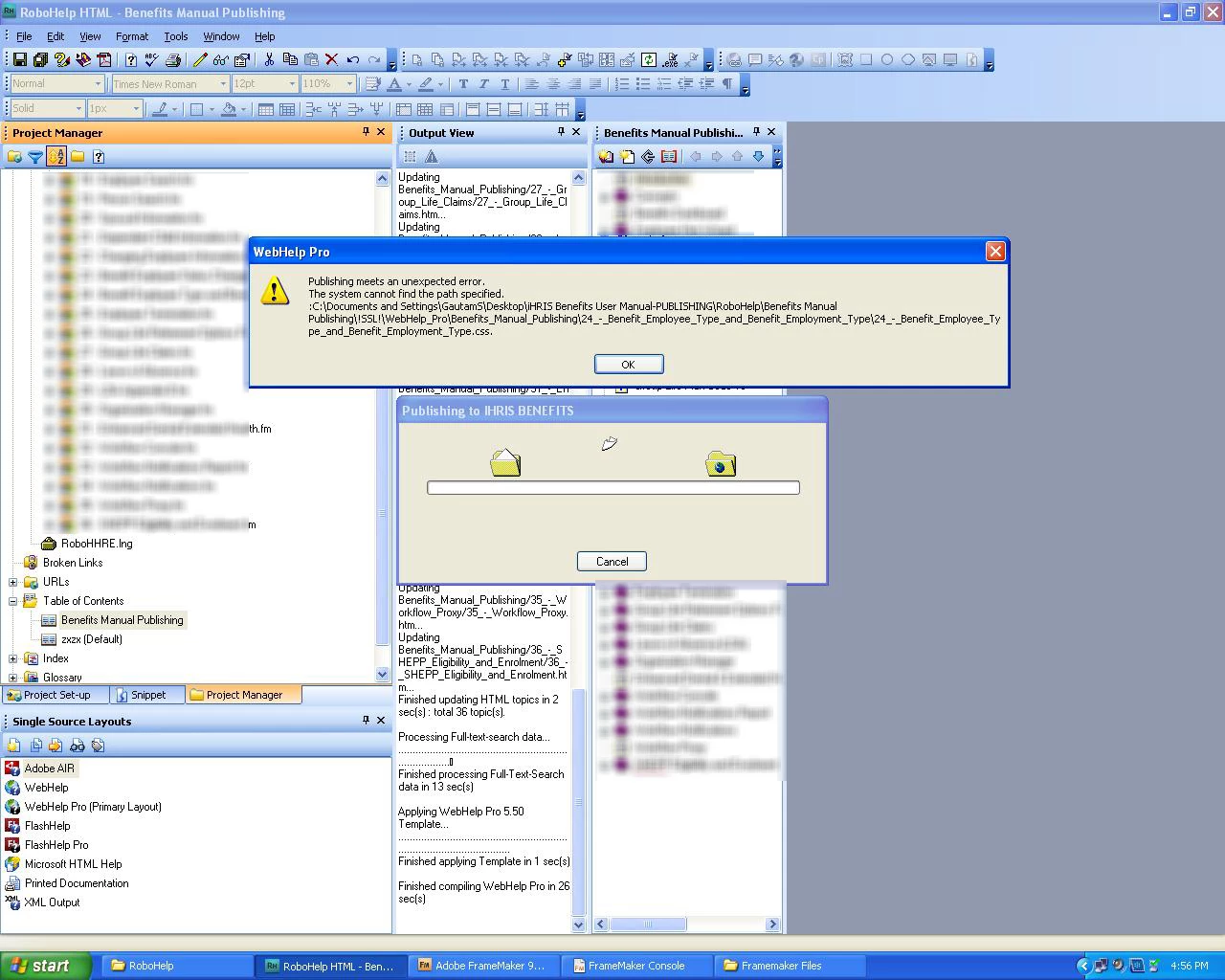
I am trying to publish a lenghty document in Robohelp. It is able to generate sucessfully in webhelp, but when I hit PUBLISH, it gives the following error (please refer to the pic:

ANy suggestions? (My entire project is stalled because of this

This topic has been closed for replies.

3 replies

Participant
February 14, 2011

To Clarify my point, I am attaching an image. If you see, I have marked the last 3 files (from below) which were NEVER included in the table of contents generated in Robohelp or Framemaker. These files however are from previously published book. I dont know from where they are being added?  (Since the information is confidential, I have to hide rest of the text)

I feel that while publishing the Robohelp overwrites files on the same location? Is there anyway to clear the server from scratch?

Thanks.

Peter Grainge
Community Expert
Community Expert
February 14, 2011

Am I being slow here?

which were NEVER included in the table of contents generated in Robohelp or Framemaker. These files however are from previously published book

If they were NEVER in a TOC in RH or FM, then what previously published book are you talking about?

I am asking somene with RoboHelp Server knowledge to take a look at this thread.


See www.grainge.org for RoboHelp and Authoring tips

@petergrainge

Use the menu (bottom right) to mark the Best Answer or Highlight particularly useful replies. Found the answer elsewhere? Share it here.
johndaigle
Legend
February 14, 2011

Hi. I'll see if I can sort this out. There is a lot going on here.

Initial Guess:

Without more information, my suspicion is that the three books at the bottom of the TOC are part of a previously published project (by you or someone else on your team) that still remains on the RoboHelp Server and you (or an administrator?) have placed a "tick" in the box that says, "Automatically merge projects of the same type" (See attached screenshot.)

If this is the case, you can either delete the older project (only if you have no need for it!) Or, you could UN-tick the box and click apply. Then those projects will no longer be merged and those three books will no longer appear.

In some rare cases, information from previous projects could be in a "cache" file on the server. So, sometimes it helps to restart the server machine to shake out the cobwebs. It's hard to say because we don't know how your IT department has set up the server machines, etc.


Questions, thoughts and tips:

  1. What version of RoboHelp Server are you using? (I'm thinking it is Robohelp Server 8, correct?)
  2. What database are you using? The default Access database, or the recommended MS SQL Server database?
  3. I see FrameMaker is being used. Are you using the import method, or have you "Linked" the FM files to this RoboHelp Project?
  4. When you "Republish all" any files with the same name will indeed be overwritten. However, any files previously published with different names will remain as "orphans" and need to be manually deleted as Peter mentioned.
  5. I see the browser tab in your screenshot reads, "New Window." The best practice is to create a custom window with a unique name and make sure you select that window name from the Default Window dropdown on the first screen of the Single Source Layout wizard.
  6. Tip: Next time, you might want to post RoboHelp Server (WebHelp Pro) issues to the RoboEngine/RoboHelp Server sub forum.

Oh! And happy Valentine's Day!

Thanks

John Daigle
Adobe Certified RoboHelp and Captivate Instructor
Evergreen, Colorado
www.showmethedemo.com

John DaigleAdobe Certified RoboHelp and Captivate InstructorNewport, Oregon
Participant
February 14, 2011

Thanks Peter and Everyone for the help.

It finally worked. But a new problem which is being created is that once the files are published to the server, some old files (from the previously published version) still ends up in the navigation table. I feel that the files are overwritten to the Robohelp server. I tried checking/unchecking the "Republish" button but of no use. Is there any way to clear and empty the RoboHelp publish server??

Thanks.

Peter Grainge
Community Expert
Community Expert
February 14, 2011

RoboHelp Server is not my area. Is that where the Navigation Table resides? If not, I'm not sure what you are referring to.

When you publish ordinary webhelp, it does not delete unwanted files from the publish location. That is a manual task. Could that be the problem here?


See www.grainge.org for RoboHelp and Authoring tips

@petergrainge

Use the menu (bottom right) to mark the Best Answer or Highlight particularly useful replies. Found the answer elsewhere? Share it here.
CraigCC
Inspiring
February 13, 2011

Hi AdobeUser,

Have you tried pasting the path/address into windows explorer (without the start page file name)? Just guessing that the path name is incorrect.

You can pick up this path from the Webhelp Settings window, output folder and start page.

My eyes aren't brilliant this time of the morning but in the screenshot you posted, I think there is a rogue colon before c:\ (ie. ':C:\Documents')

Kind Regards

Craig

Peter Grainge
Community Expert
Community Expert
February 13, 2011

Also the path looks to be very long. Try publishing to C:\MyFoldername.


See www.grainge.org for RoboHelp and Authoring tips

@petergrainge

Use the menu (bottom right) to mark the Best Answer or Highlight particularly useful replies. Found the answer elsewhere? Share it here.