
Inspiring
March 9, 2017
Answered

User Defined Variable in Title field

  • March 9, 2017
  • 2 replies
  • 884 views

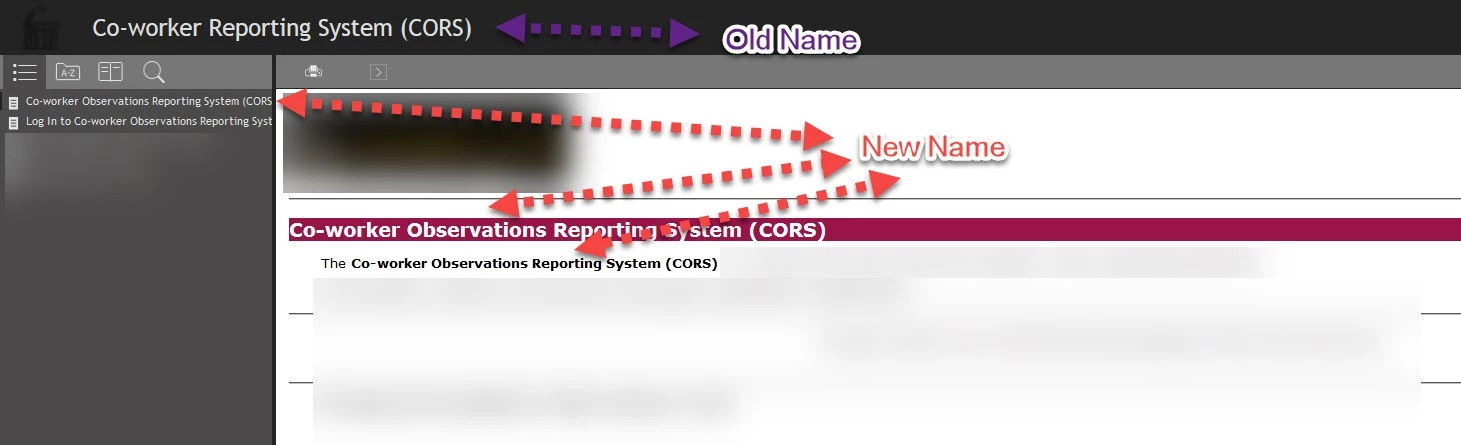
Recently, I created a RoboHelp project for a new system. When I did, I defined a user defined variable for the name of the system. Earlier today, I was informed the name of the system was being changed. I opened my RoboHelp project and changed my user defined variable to the new value & recompiled. I then discovered that while my TOC & text within the topics had been updated, the tile of the help system that displays had not changed.
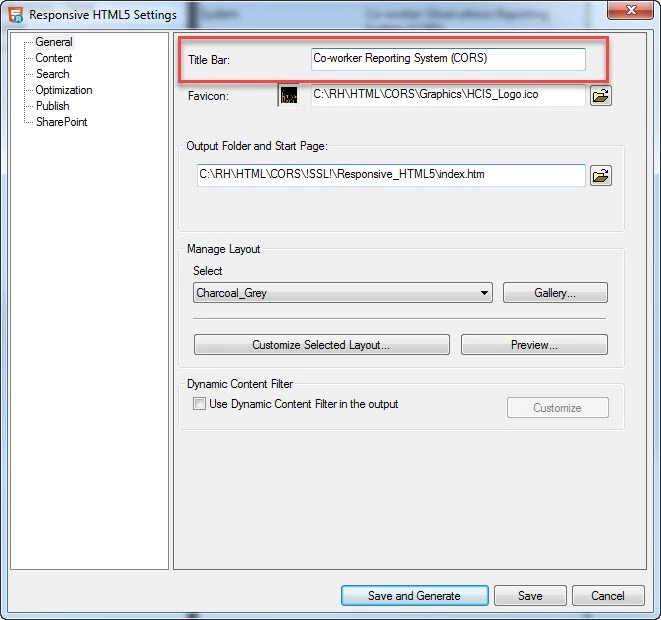
I know the title is set in the Title Bar field on the General tab, as shown below. If you ran into this situation, how did you handle it?
Paul Hanson

This topic has been closed for replies.
Correct answer Captiv8r

By editing the title in the field you pointed out in your second image.

I believe that's really the only way you will find to achieve it.

Cheers... Rick

2 replies

Captiv8r
Captiv8rCorrect answer
Legend
March 9, 2017

By editing the title in the field you pointed out in your second image.

I believe that's really the only way you will find to achieve it.

Cheers... Rick

prhmusic2Author
Inspiring
March 9, 2017

Rats. It would have been really cool to be able to insert a UDV into the TItle Bar field like you can for a Topic Title.

Paul

Captiv8r
Legend
March 10, 2017

Might be worth taking the time to submit a feature request.

Click here

Cheers... Rick

prhmusic2Author
Inspiring
March 9, 2017

More information.

On a whim, I pasted the UDV into the Title Bar field:

When I recompiled, I saw this, which tells me I cannot paste the UDV into the Title Bar unless I would want the name of the tab to be extremely odd...

Paul