



Marc M.
Inspiring
April 25, 2023
Question

Using different font in published project

  • April 25, 2023
  • 3 replies
  • 361 views

Hello Robohelp-Community,


at the moment we are struggling with the usage of other fonts in our published project we created in Robohelp.

We have the company standard font "TitilliumWeb".


This is the path of the published project:

\\srv-cas01\OnlineHelp\TestDE


Where do we have to create the font.css (or is it "fonts.css) ?

We tried to create this here:

\\srv-cas01\OnlineHelp\TestDE\assets\css


We also moved the font to this folder in "css".
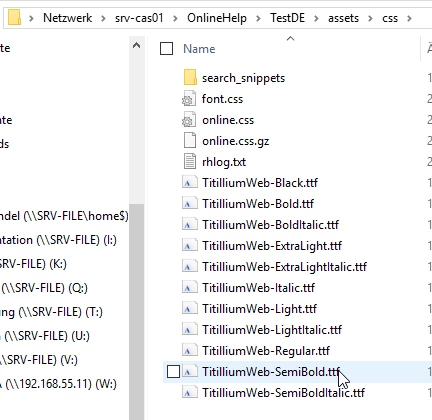
 

The content of font.css is the following:

@11220649-face {
font-family: "TitilliumWeb";
src: url("TitilliumWeb-Regular.ttf");
}


When we now open the HTML Page as "WebView" there is still another font used. 

We don`t see the configuration problem. Is it the code in "font.css" or another problem?


Thanks for your kind help in advance!


Kind regards,

Marc Mendel


    This topic has been closed for replies.

    3 replies

    Peter Grainge
    Community Expert
    Community Expert
    April 26, 2023

    I don't think it should make a difference but which version of RoboHelp are you using?


    It is likely working for PDFs as the font is available on your machine when you generate. Does your online output work on your machine in a generated output but not on other machines without that font?


    Have you downloaded the demo project and tested that works?

    ________________________________________________________

    My site www.grainge.org includes many free Authoring and RoboHelp resources that may be of help.


    Use menu (bottom right) to mark as Best Answer or to Highlight particularly useful replies. Found the answer elsewhere? Share it here.
    Community Expert
    April 25, 2023

    A quick thing to check is that the font-family text matches the name of the installed font, which can be a bit different from the file name. Do look at Peter's site grainge.org for the font information if you haven't already.


    If you're using a separate css file to store the font-face definition, you also need to make sure that css file is either imported into your regular stylesheet or applied to every topic in addition to regular stylesheet


    Marc M.
    Marc M.Author
    Inspiring
    April 26, 2023

    We already took a look at Pter Grainge`s Homepage and used the code he provided.

    When we create a PDF out of our RH project, we get the right font already.

    That`s why we don`t know what we`ve done wrong or forgot on this.

    Jeff_Coatsworth
    Community Expert
    Community Expert
    April 25, 2023

    Have you been following Peter's site with its discussions of fonts?